The IT leader's guide to AI
Explore our comprehensive guide to AI, designed to help IT leaders understand and make use of AI's full potential.


 Share on Twitter
Share on Twitter

 Share on LinkedIn
Share on LinkedIn

 Share on Facebook
Share on Facebook

 Share by Email
Share by Email

 Print this page
Print
AI chatbots for customer experience
Since conversational AI chatbots launched in 2022,1 they have become an essential part of everyday life — and of great customer experiences. Chatbots are the most accessible way for most businesses to integrate generative artificial intelligence (GenAI) into their user experience, which is why they’re everywhere.
When done well, generative AI lets you build personalized customer interactions tailored to their specific needs and context. An AI chatbot for customer service can put AI at the front and center of your user journey, increasing customer satisfaction and boosting productivity.
Despite the benefits of AI chatbots for customer service, many businesses are still intimidated by the integration process. Thankfully, there’s a right way to build an AI chatbot. With the right tools and the right partners, you can avoid the common pitfalls and create satisfying customer experiences without the roadblocks.
Ready? Chatbot says: yes.
What is an AI chatbot?
Put simply, a chatbot is a conversational interface that mimics human interaction, generating contextual responses based on a user’s question. Chatbots (and voice bots) powered by generative AI, deep learning, and machine learning answer customer questions and resolve issues without engaging a customer service agent. The result: your agents save time and improve customer satisfaction.
Chatbots have been around since the 1960s2 and have evolved from predefined text interactions to natural conversations enabled by today’s technology. Now, virtual agents use GenAI, natural language processing (NLP), and large language models (LLMs) to understand and process a user’s query, tailor a response based on proprietary data, and use human language to generate an answer.
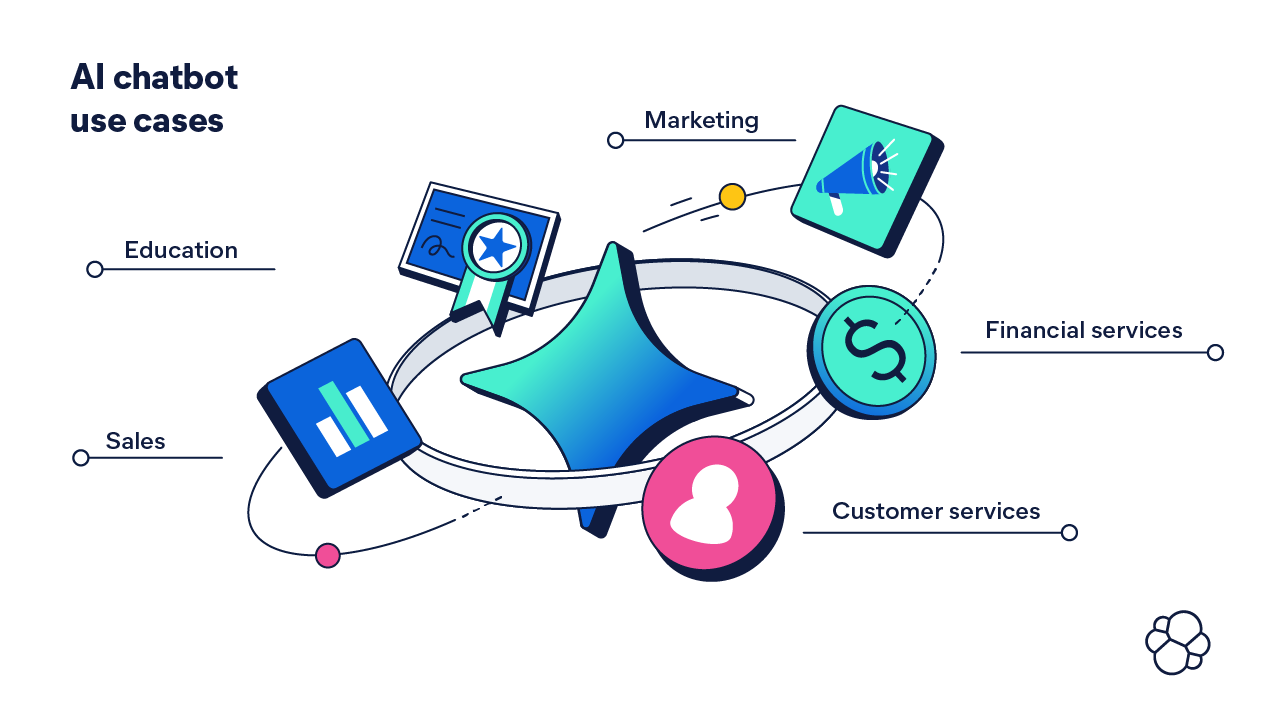
Use cases for AI chatbots are growing every day. These chatbots are increasingly used across industries:
- Sales: Generating leads and scheduling appointments.
- Marketing: Promote products, offers, and educational content.
- Education: Providing personalized tutoring and answering students’ questions.
- Financial services: Gathering information from users and identifying trends.
- Ecommerce: Offering personalized product recommendations.
- Customer service: Providing 24/7 customer support.
With AI chatbots, your team can avoid manually collecting data, analyzing it, and searching for a solution. Instead, AI empowers your teams and your customers to identify and solve problems in real time.
How are AI chatbots used to improve the customer experience?
Customer experience encompasses every interaction a customer has with a company during their buying journey. Poor customer experiences can directly result in lost business, with 73% of consumers3 willing to switch to a competitor after multiple bad experiences. Whether it’s product discovery or post-purchase support, every interaction has to be fast and easy and leave a positive impression. That’s why AI for customer experience makes all the difference.
AI chatbots for customer experience identify and solve user problems on the go, helping your business run more efficiently. And customers reap the benefits.
Ninety percent of customers expect an “immediate” response to customer service issues,4 while 81% will always seek self-service options — before reaching out to an agent.5 AI is helping businesses answer the call.
Intelligent virtual agents engage in solution-oriented conversations, answer questions accurately, and, as a result, provide great customer experiences. This means customers who have a positive chatbot experience are more likely to have a positive relationship with your company.
Generative AI chatbots empower you to answer any of your customers’ questions instantly, no matter the volume. No waiting, no unresolved queries, no unhappy customers.
Top 10 benefits of AI chatbots for customer experience
- Provide proactive customer service 24/7, including self-service
- Offer hyper-personalized experiences
- Ensure consistency and accuracy in responses
- Collect customer feedback
- Automatically learn from each interaction
- Boost customer engagement
- Easily scale support operations
- Streamline customer service productivity with triage
- Reduce business costs
- Serve more customers, faster
Examples of AI chatbots for customer service
With generative AI-powered chatbots, customers or your support team can query your internal knowledge base, product pages, and more to get personalized answers quickly.
Elastic’s own Field Engineering team set out to integrate generative AI into our customer success and support operations. We created a self-service chatbot experience that answers support-related product questions. Use of the chatbot will accelerate support agents’ analysis and investigation, reducing the mean time to resolution.
The AI-powered chatbot increased our support team’s efficiency and effectiveness, improved issue resolution, and boosted customer satisfaction by operationalizing two workflows:
- Using generative AI to automate case summaries in cases when the issue isn’t resolved and has to transition to another support engineer
- Using LLMs to provide a relevant and accurate answer as an initial reply to ensure a timely response
Need another use case? A customer who purchased a video doorbell needs help installing it. Instead of looking through the vendor website’s FAQs or trying to explain the problem to a customer service representative, they upload a photo of their setup to a chatbot, which, in response, instantly offers personalized troubleshooting advice.
Behind the scenes, the key to the success of these chatbots is the precision of search that finds the right data at the right time for generative AI systems to generate context-specific answers using a workflow called retrieval augmented generation (RAG). RAG infuses the LLM with your proprietary, trusted, and relevant data to ground it with the context and relevance that your customers need.
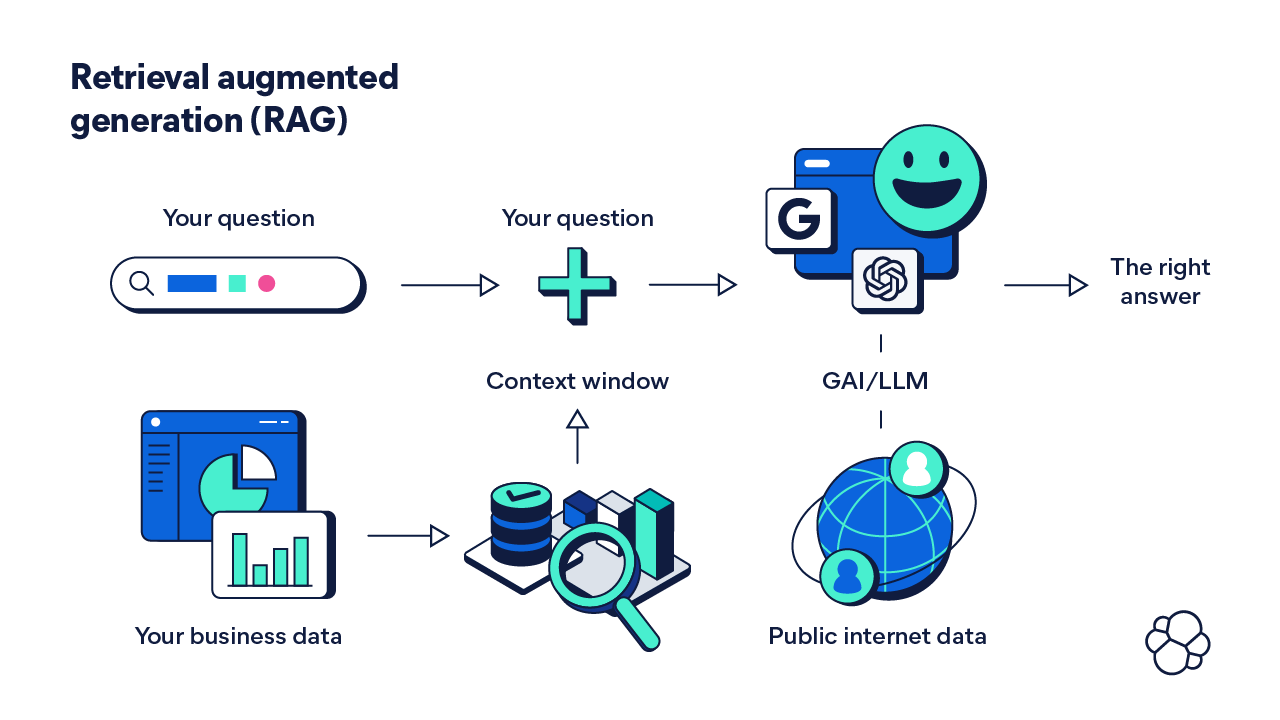
Search enables self-service for customers — like the video doorbell example — empowering them to find all the relevant information themselves, within the context of their query. Similarly, this search ability empowers customer support teams, who can use LLMs to find relevant answers specific to their organization, faster and more efficiently than ever before.
The drawbacks of using an AI chatbot for customer service
Drawback: Hallucinations — misleading or incorrect information presented as truth to users — are among the most frequently occurring problems with AI chatbots. Some experts estimate that a few LLMs invent information at least 3% of the time and others as often as 27%.6
Ensuring a chatbot doesn’t hallucinate is one of the most important tasks for a business. After all, serving falsehoods to a customer can reduce customer trust.
Solution: An LLM is only as good as the data it’s trained on. When an LLM uses publicly available information that might be outdated, the likelihood of a generic or false response increases. To solve the problem, fine-tune the existing pre-training LLM using RAG to bring in trusted, proprietary data to provide the needed context to the conversation.
Drawback: The rapid adoption of this emerging technology has increased the potential for cybersecurity risks. Attackers can take over your chatbot to conduct phishing attacks, intercept sensitive information, or exploit software vulnerabilities. Is it worth deploying generative AI for customer experience if it leads to reputational damage and customer data leaks?
Solution: Like with any new technology, the first step before adopting it is understanding and prioritizing the risks. You can mitigate the risks when, and if, you are aware of them and adopt the latest best practices, tools, and methods used by AI developers and security professionals.
The future of AI for customer experience
As the technology continues to evolve, more and more businesses will realize the benefits of using AI chatbots to enhance their customers’ experiencesWhat will your AI chatbot for customer service look like? Imagine it interpreting complex queries from a photo, offering instant troubleshooting for product installation. Or guiding employees through critical tasks like triaging security threats. With generative AI, the potential to elevate customer experiences is immense — whenever you're ready to harness it.
Cybersecurity in the AI era
In 2023, a record 343 million individuals fell victim to cybercrime, and with each passing year, cyberattacks grow in frequency and complexity.7 It's no wonder that over 97% of organizations admit facing IT security challenges and 89% of IT leaders consider security their top priority.8
In addition, AI hackers and human threat actors are arming themselves with generative artificial intelligence (GenAI) — taking threats to a new level. Are you and your organization prepared?
The top risks AI poses to cybersecurity
When OpenAI launched its large language model (LLM) ChatGPT in 2022, millions of people flooded to test it. But soon, curiosity turned into concern. LLMs and other GenAI tools open up new ways for hackers to breach even the most advanced cybersecurity defenses.
"For all their potential, broad LLM adoption has been met with uneasiness by enterprise leaders, seen as yet another doorway for malicious actors to gain access to private information or a foothold in their IT ecosystems." — Jake King, head of threat and security intelligence, Elastic
Threat actors can access AI-powered chatbots and apps on the dark web to wreak havoc with:
- AI-written code: AI chatbots, trained on troves of hacking data, assist cybercriminals with writing malicious code and creating undetectable malware.
- Expert phishing: Scammers from anywhere in the world create grammatically correct emails, deepfake videos, or audio messages for convincing phishing and effective social engineering attacks.
- Surveillance at scale: AI helps hackers to efficiently search through massive amounts of data for potential leaks and vulnerabilities.
- Scaling attacks: Once a system is breached, GenAI empowers criminals to amplify their attacks, automatically generate more malicious code and target even more vulnerabilities at scale.
- Prompt injection: When hijacked, a compromised LLM leaks sensitive corporate data, spreads misinformation, and can be used to take over an entire IT system.
AI can find and exploit vulnerabilities with superhuman speed, scale, sophistication, and scope. The good news is that AI hasn’t orchestrated a multi-stage cyber attack without human intervention. So while AI hacking is here, human hackers are still needed to carry out attacks.
How is AI used in cybersecurity?
Protecting yourself from AI hacking using manual (human-powered) tools and methods is practically impossible. Just as AI-driven tools enhance hackers' ability to attack, AI's computational power enhances your organization’s detection, prevention, and response to cyber threats.
Cybercriminals are continuously developing new tactics — and wielding the power of GenAI — to breach security defenses. But you can stay ahead of them with your own GenAI cybersecurity tools. Machine learning, natural language processing (NLP), and other technologies enable security systems to learn from historical data, detect new threats, and make real-time decisions.
Top 5 benefits of AI for cybersecurity
In general, AI enhances both the efficiency and the overall security posture of your operations. That’s table stakes. When GenAI and LLM implementations are safely adopted, AI can:
- Process and analyze vast amounts of data quickly, providing real-time insights and actionable intelligence.
- Enhance accuracy in threat detection and response by minimizing false positives.
- Automate the initial stages of incident response, reducing the time it takes to respond.
- Learn and adapt, ensuring security systems remain effective against the latest threats — maintaining your proactive security posture.
- Streamline routine tasks and reduce the burden on your security teams.
By leveraging AI in security, you as an IT leader can maintain a proactive and adaptive security strategy, ensuring better protection of your organization’s data and assets with fewer resources. You’re able to do more with less.
Advancing the SOC with AI
Arguably the most important benefit of using AI for cybersecurity is human-related. IT experts estimate that the cybersecurity industry faces a global shortage of nearly four million professionals.9 A talent gap this wide requires a complex solution, and AI can help ease the challenge for any organization.
For example, since AI minimizes false positives, your security operations center (SOC) team doesn't need to spend days manually checking multiple alerts. Instead, your SOC becomes more effective and efficient, and you reduce the risk of successful attacks and minimize the potential impact of security breaches.
What's more, AI automation enables your SOC to concentrate on strategic, complex, or critical tasks instead of painstakingly updating your systems with the latest data, creating or converting a detection rule, or triaging alerts.
At Elastic, we're seeing significant time savings with our own AI-driven security analytics.10
Our security analysts can:
- Investigate a threat in 30–60 minutes instead of 2–20 hours
- Respond to an incident in 30–60 minutes instead of 2–10 hours11
- Triage hundreds of alerts in seconds or minutes instead of 10+ minutes per alert
Our security administrators can:
- Collect and normalize a new data source in 10 minutes instead of 1–4 days
- Create or convert a detection rule in 15 minutes instead of 1–3 hours

AI in cybersecurity use case examples
AI can be used in a variety of ways in cybersecurity, from threat detection and incident response to endpoint vulnerability management.
Advanced threat detection and prevention
AI systems can analyze network traffic, user behavior, and system logs to identify anomalies that may indicate potential threats. By detecting these threats early, your teams can take proactive measures to mitigate risk and prevent data breaches.
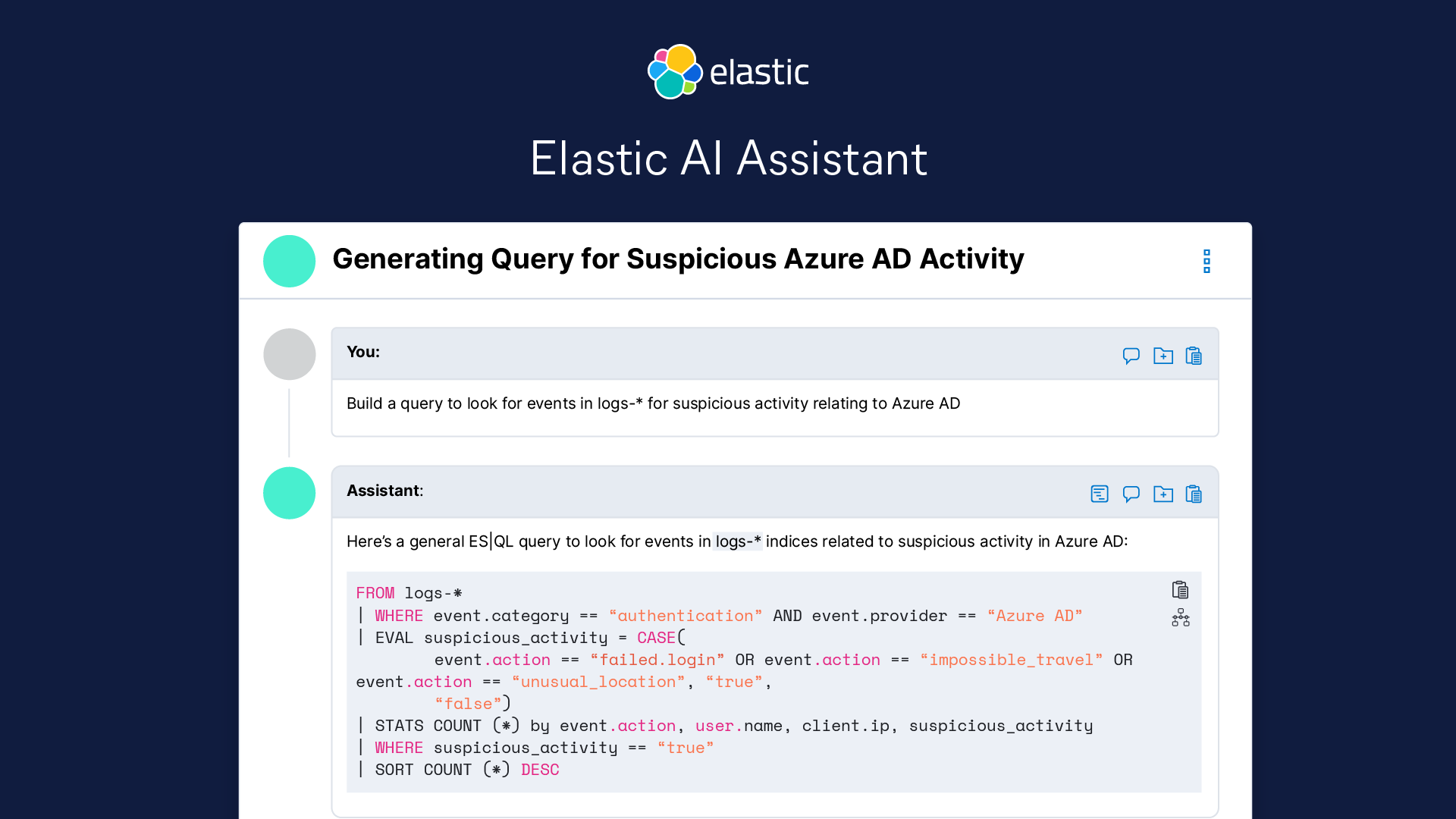
You can enhance your AI-powered defenses even further by leveraging GenAI to boost your SOC team with an assistant, such as Elastic AI Assistant. It offers security professionals a chat interface to ask questions using natural language and receive context-aware, actionable recommendations. Elastic AI Assistant guides analysts through triage, investigation, and response and helps admins with routine tasks. It doesn’t replace your cybersecurity experts, but it can help your junior analysts make fast and accurate decisions, helping to ease the cybersecurity labor gap.
AI-driven SIEM
A security information and event management (SIEM) system is the core of your cybersecurity stack, offering an integrated approach to detecting, analyzing, and responding to security incidents. When powered by AI-driven analytics, it can eliminate your security operations’ blind spots, strengthen defenses, and accelerate workflows.
And while migrating from a legacy SIEM to an AI-driven system might seem like a daunting IT task, GenAI can simplify it by automating the development of custom data integrations. Instead of days, your security ops can connect data sources in minutes, facilitating broader visibility and easier implementation.
The drawbacks of adopting AI for cybersecurity
Drawback: Hallucinations — misleading or incorrect information presented as truth to users — are among the most frequently occurring problems with GenAI. When it comes to cybersecurity, fake, or even malicious, code is a serious risk.
A recent survey found that 92% of developers are already using AI coding tools,12 so it's a real possibility that an LLM provides a made-up solution to a coding problem or a security query.
Solution: An LLM is only as good as the data it’s trained on. When an LLM uses publicly available information that might be out of date (or hijacked by an AI hacker), the likelihood of a false or malicious response goes up. To solve the problem, you must fine-tune the existing pre-trained LLM using retrieval augmented generation (RAG) with critical domain-specific context from proprietary data.
Drawback: Overdependence on AI — the more you come to depend on the technology instead of the professionals on your team, you create a false sense of security. If you rely too much on AI, your security teams might become complacent or overlook an attack.
Solution: When it comes to cybersecurity, human experts bring a unique perspective to interpreting complex threats, making strategic decisions, and understanding the broader context of cyber incidents. It's crucial to strike the right balance between human intervention and AI-driven automation. Develop a strategy to keep AI in check. At the very least, continuously monitor your AI use cases and implement an AI governance framework, with your human security team members remaining at the helm.
The future of AI in cybersecurity
As AI evolves, it will adapt to new forms of cyber attacks, providing your organization with smarter, more resilient defenses. However, AI will also be used by attackers, making it essential for cybersecurity strategies to stay one step ahead. AI will continue to transform cybersecurity, augmenting human security analysts’ capabilities while empowering your teams to anticipate and prepare for the constantly evolving threat landscape.
AIOps
Every day, large enterprises generate as much as 1.8 zettabytes of data. With every new data source or stream, your infrastructure becomes more complex. IT leaders like you have to figure out how to parse through the noise to get to the relevant data and quickly gather insights — and, ultimately, derive value for their organization — while effectively monitoring system operations, application performance, and security.
It’s no wonder that nearly all of your peers (96%) admit to facing problems with analyzing data and producing insights. Nowhere is this more evident than in operations: 95% of surveyed organizations encounter observability challenges.
Tasked with improving operational resilience, you’re also continuously adding new environments, services, and applications. Coordinating various data streams and monitoring across disparate systems is critical.
Wouldn’t it be easier if you could ask an artificial intelligence (AI) assistant to point out anomalies in your telemetry data, interpret log messages, help understand application errors, analyze alerts, and make suggestions for remediation and more efficient code?
That’s all possible with artificial intelligence for IT operations (AIOps) and generative AI (GenAI). You can automate your IT operations at scale and quickly get answers from data, while also ensuring the answers you’re getting are context-aware — based on your business's proprietary data.
Let’s dive into how to modernize your IT operations.
What is AIOps?
AIOps tools take advantage of supervised and unsupervised machine learning (ML), natural language processing (NLP), large language models (LLMs), and other advanced AI techniques to improve IT operational efficiency. It unlocks the power of your data and enables relevant, real-time insights.
Out: manual processes, data silos, tool sprawl, and cluttered event management In: AI-powered insights, a unified platform, and automated alert management
What about your return on investment on this technology? Less time spent detecting, investigating, and recovering means more efficient use of resources, improved uptime, and a stronger infrastructure.
Say your retail business is running a big annual sale when your site crashes. With AIOps, you can get back online within minutes — even before your team notices that something is wrong. Instead of waiting for your IT teams to discover the issue by chance, while manually looking through numerous dashboards, AI can zero in on performance issues, investigate, and alert your engineers with possible solutions.
With AIOps, your site reliability engineers (SREs), who are tasked with keeping all systems up and running, can comprehensively review all the alerts in a single dashboard, easily navigate all data, and prioritize critical alerts that can make or break your business. If your data is siloed and your SREs rely on manual processes to conduct root cause analysis, your site is likely to remain offline for hours or more. This can cost you millions in lost revenue13, a damaged reputation, and a broken customer experience.
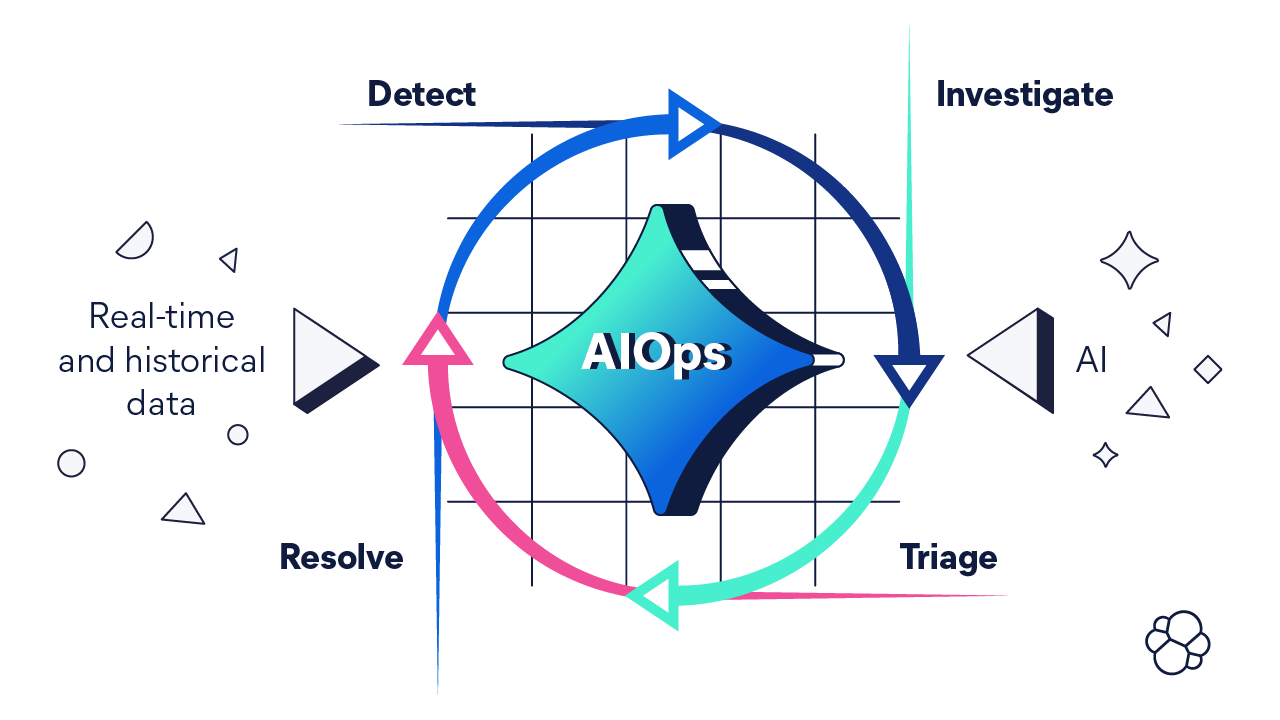
Delivering business-critical functionality means proactively detecting, investigating, triaging, and resolving incidents in complex environments. Problems can occur on any layer — infrastructure, application, or user experience — and can be detected through any data type — logs, operational and business metrics, traces, or synthetic monitoring. Modern hybrid cloud architectures bring complexity and little visibility by default. As a breath of fresh air, AIOps allows your IT teams to spend more time focusing on critical and revenue-generating tasks instead of continuous monitoring and repetitive chores.
Getting the most out of AIOps tools
AIOps tools allow you to improve your operational efficiency by accelerating mean time to resolution (MTTR), fostering collaboration, and unlocking knowledge to empower your teams.
An AI assistant can help your SREs interpret log messages and errors, optimize code, write reports, and even identify and execute runbooks. You can see one in action today.
What’s more, an AI assistant can learn and grow its knowledge base by conversing with SREs or performing tasks. It incorporates your internal, business-specific information with the LLMs and delivers highly relevant, up-to-date, and accurate results. This, in turn, accelerates root cause analysis and resolution, even in the most complex environments.
Top 5 benefits of AIOps for IT leaders
1. Proactive problem resolution
AIOps tools analyze data continuously, from any source, identifying anomalies as soon as they appear. This means you can detect and resolve problems before they impact your users or shut down your services.
2. Enhanced operational efficiency
Automation not only reduces manual workloads, it also minimizes human error. Less time spent on monitoring, alerting, incident resolving, and reacting means more time for business-critical, strategic tasks.
3. Reduced downtime
AIOps delivers faster incident resolution, streamlined processes, and more reliable services. For many use cases, a faster MTTR becomes minutes instead of days. Reduced downtime means saving money and resources.
4. Real-time analytics
Processing data in real time makes it easier to manage systems and address issues without disrupting operations. With real-time analytics, your operations teams can make informed decisions faster, identify the root causes of incidents, and continuously improve your operational resilience and efficiency.
5. Noise reduction
By reducing tedious manual monitoring, your SREs are less likely to experience alert fatigue and make mistakes. AIOps tools alert your human teams to critical issues requiring their immediate attention, providing context and speeding up resolution times. Less noise also means more time to concentrate on real incidents rather than dealing with alert storms.
Use cases of AIOps
AIOps can provide value across industries. Retailers, for example, can use AIOps tools to ensure their applications and services are running, customers are satisfied, and transactions and revenue are flowing without interruptions.
Regardless of your industry, AIOps can help transform your IT operations. Here are two examples:
Incident response automation
Automatically resolve common issues based on patterns in historical data. Integrate AIOps with your IT service management (ITSM) systems, automating the creation of incident tickets as well as the resolution. Once AI encounters an issue you have resolved before, it will initiate predefined workflows to resolve it again. No more surprise software failures, user mistakes, or outages.
Capacity planning
Optimize infrastructure use and scale resources efficiently based on past usage needs. Use AIOps to monitor your resources and predictive analytics to identify trends and forecast future needs. Optimize application availability and workloads across your infrastructure, and allocate your resources more efficiently, in real time.
Challenges with AIOps for IT leaders
Yes, there are many reasons to adopt AIOps for your IT operations, but there are also adoption hurdles. But withFortunately, these challenges comhave solutions. With the right tools, data, and organizational culture, you can implement AIOps with ease.
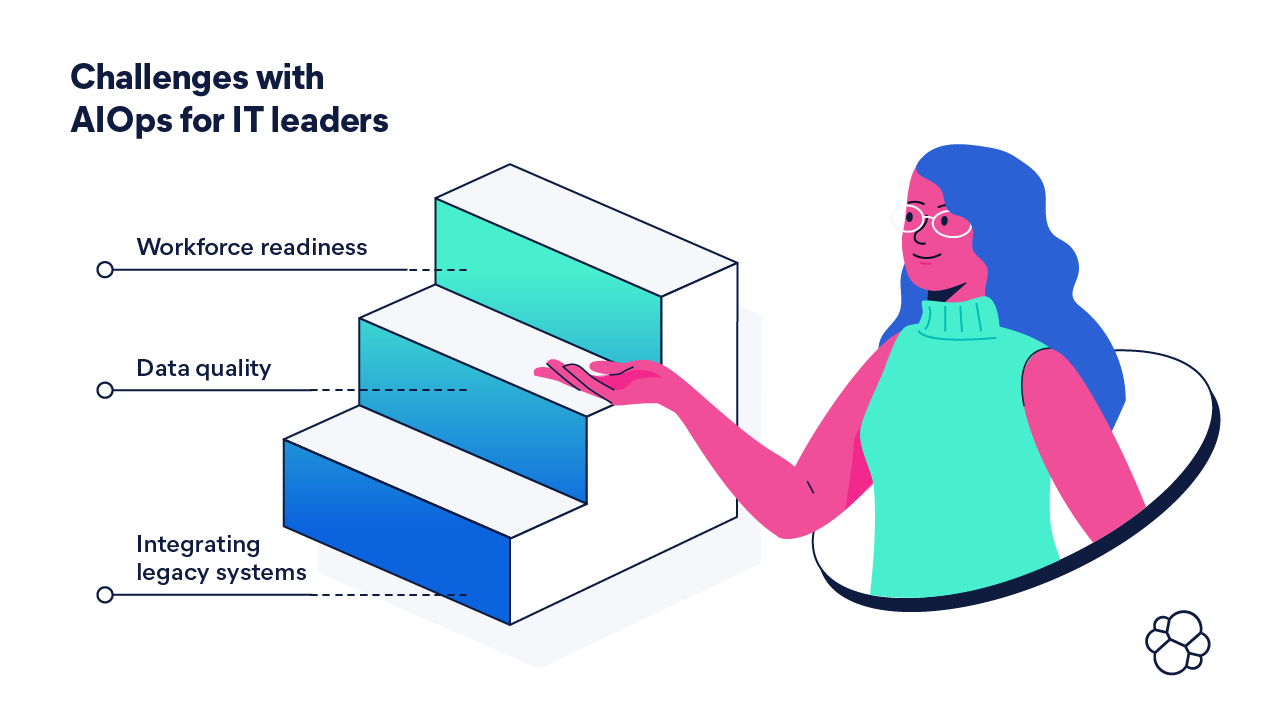
Challenge 1: Integrating legacy systems AIOps tools are meant to simplify your IT, but integrating your legacy systems and existing tools with a new AIOps framework can seem overwhelming.
Solution: The more complex your architecture is, the more difficult it is to monitor, optimize, and secure. Your existing legacy systems and data silos result in a fragmented picture of your system, causing your teams to potentially miss critical IT problems, security vulnerabilities, and regulatory compliance issues. Start with an integration strategy. Then, choose your AIOps tool. Is it easy to integrate with your various systems or does it replace them? Does it minimize operational disruption? Does it enhance interoperability? Make sure to continuously monitor and improve your integration process. You can also take advantage of migration tools — such as the Express Migration program — to accelerate your evolution to a next-generation observability solution.
Challenge 2: Data quality Data makes (or breaks) AIOps, especially generative AIOps. Poor data quality limits AI’s ability to recognize patterns and behaviors, resulting in inaccurate predictions and missed insights.
Solution: The best AIOps tools can collect and analyze your entire data set — even real-time data and telemetry — at high granularity. Start by adopting a fully integrated observability solution, ensuring high-quality data, and implement AIOps on top of it. Make sure your solution includes tools to clean, map, and prepare data, as well as manage data integrity. Data governance is also a must — it can help you monitor the quality of your data and improve data security and compliance.
Challenge 3: Workforce readiness AIOps requires a cultural shift and specialized skills, such as ML and data science, that you might not have access to.
Solution: Include workforce readiness plans in your integration strategy. Prioritize critical deployment areas first, and adopt a tool that streamlines model training and signal ingest. Upskill or retrain your workforce to move from manual processes to AI-driven ones. Take advantage of such tools as an AI assistant that can help your team interpret log messages and errors, optimize code, write reports, and even identify and execute a runbook.
The future of AIOps
AIOps empowers today’s IT leaders to focus on strategic initiatives by reducing time spent on routine tasks and improving decision-making with better, more accurate, and actionable insights.
Tomorrow, how will you use generative AIOps for your observability needs? Imagine autonomous remediation, covering more incidents and scenarios. Or, a closed-loop observability system that can collect, store, and analyze data while detecting and resolving problems automatically, with less human intervention. Your teams will have more time to focus on complex projects and innovation, helping to advance your organization and keep it competitive.
AI skills and talent gap
We all can agree that generative AI (GenAI) has the potential to transform the way we live and work. In fact, 99% of surveyed IT leaders said that they believe that GenAI has the potential to drive change within their organization.
Driving change within an organization means having the right people for the job. Here lies one of the biggest obstacles to implementing GenAI: the artificial intelligence (AI) skills gap.
The AI skills gap is two-fold. On the one hand, AI can help (and is helping) to bridge the gap by playing a central role in upskilling, reskilling, and supporting existing employees. On the other hand, there’s a critical shortage of specialists who can implement and execute AI initiatives in the first place.
Let’s start with the latter.
The scarcity of AI talent
Demand for artificial intelligence skills far exceeds supply. In 2024, the hiring gap is estimated to approach 50% of all AI positions needed.14
AI is developing at a breakneck pace, and the gap between the organizations that can leverage it and the vast majority that can't is set to widen further. Experts from IDC predict that by 2026, more than 90% of organizations worldwide will suffer from the skills shortage, amounting to approximately $5.5 trillion in losses caused by product delays, impaired competitiveness, and loss of business.15
While GenAI promises to enhance customer experiences, mitigate security risk, improve operational efficiency, and significantly drive productivity, IT leaders struggle to reap the benefits.
Technology leaders from both midsize and large companies rate the AI skills gap as the foremost one, compared to skills gaps in other IT fields such as cloud computing or data science.16
Similarly, IT teams themselves name the lack of AI skills in the workforce as their top AI challenge. It’s followed by data security, data quality, slowing down other initiatives, and prohibitive cost.17
While there are ways to solve data security or quality issues relatively easily, finding the right (or any) talent isn't as straightforward. You probably have first-hand experience with the fierce competition for top candidates and, maybe, even participated in a bidding war, known as the new "gold rush."18
The missing AI skills
Several skills gaps in the workforce are making it difficult for companies to fully leverage AI’s potential. Here are some of the key technical AI skills that are needed:
- Machine learning operations (MLOps): While many organizations can build machine learning models, deploying and maintaining them in production environments is challenging. MLOps combines machine learning with DevOps to ensure models can be reliably scaled, updated, and monitored in real time.
- Prompt engineering: Prompt engineering involves designing effective prompts to get accurate, relevant, and creative outputs from AI models. Understanding how to craft prompts for specific use cases, tune the responses, and manage context is essential in maximizing the potential of generative AI models. Some AI assistants, like the Elastic AI Assistant, help with prompt engineering by offering recommendations for prompts that empower your teams' cybersecurity or observability operations.
- Data science: Data science is essential for AI, combining statistical analysis, data mining, and big data technologies to extract insights from structured and unstructured data. A strong data science foundation involves working with data pipelines, performing exploratory data analysis, and using visualization tools to communicate results.
- Natural language processing (NLP): From sentiment analysis to language translation, natural language processing (NLP) powers chatbots, virtual assistants, and search engines. Proficiency in NLP enables teams to build systems that can engage with users in natural conversations or extract meaningful information from text.
- Deep learning: A subset of machine learning, deep learning focuses on artificial neural networks with many layers, known as deep neural networks. It’s the driving force behind significant advancements in image recognition, speech processing, and autonomous systems. Deep learning requires knowledge of frameworks and the understanding of concepts such as neutral networks, deep neural networks, and models like convolutional neural networks (CNN) and recurrent neural networks (RNN).
- AI ethics: This involves ensuring that AI systems are developed and used in a way that is fair, transparent, and accountable. AI ethics includes topics like bias detection, fairness in algorithmic decision-making, and respecting user privacy. Possessing this skill ensures that AI technologies are deployed responsibly, mitigating unintended consequences or harm.
To solve the problem of missing skills, many organizations are turning to AI for help.
Bridging the AI skills gap
AI-enhanced hiring
For one, organizations are using artificial intelligence to help find the right candidates. AI-enhanced skills-based hiring, in particular, has been helping HR professionals to match people to jobs, even if their formal education or background doesn’t match a certain job description.
The US Chamber of Commerce recommends that small businesses use AI-driven tools — such as chatbots or automated skills assessments — to streamline the screening process.19
This comes with the caveat that the AI is only as good as the data it's trained on. To avoid bias and improve fairness, the AI system needs to be trained on data that represents all the individuals in the talent pool and take unconventional career paths, education, and gaps in work history into consideration. The AI tool you choose should look for the potential in the people behind the resumes.
Reskilling and upskilling
Hiring aside, talent development through reskilling and upskilling your existing workforce is a valuable option. Instead of spending your resources on finding and onboarding new employees, you can develop your current talent and build the AI skills they need to drive innovation in your organization.
It’s also a solution that most of your employees would applaud. In 2023, a survey found that over 50% of employees believed that the GenAI skill set will be essential for their role, but only 13% have been offered any AI training.20
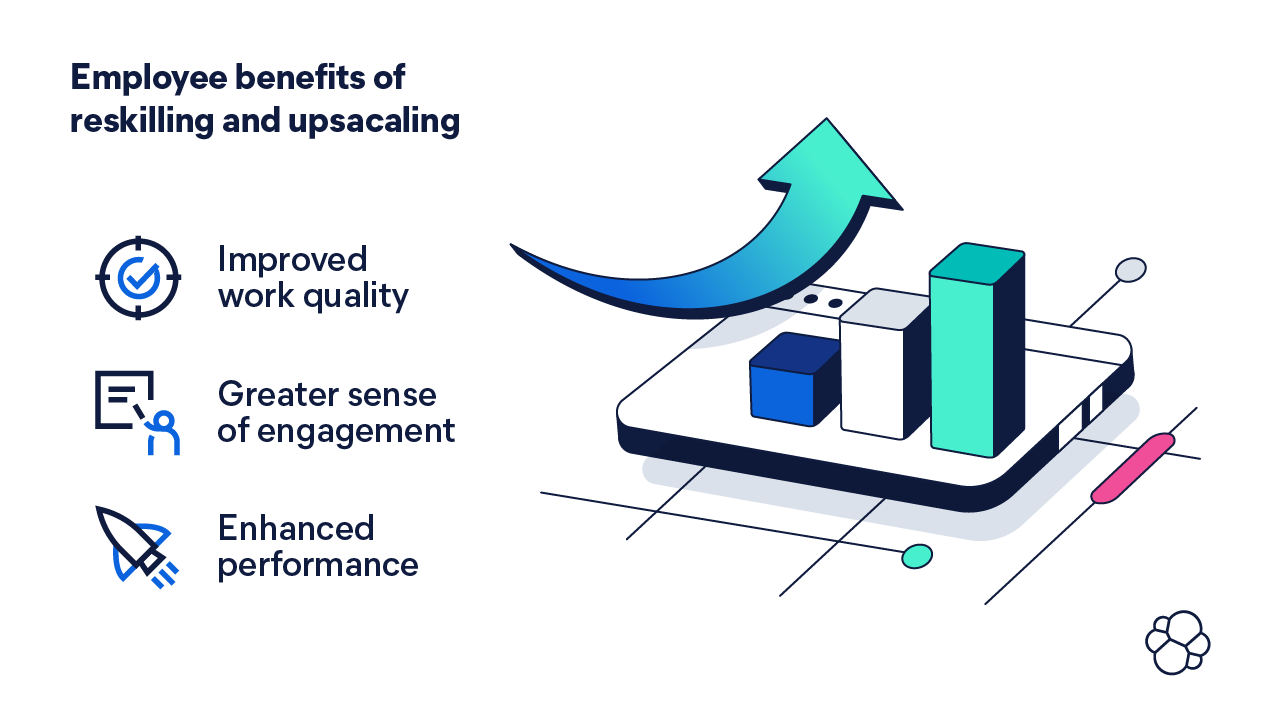
Here are the benefits to employees when they reskill and upskill:
- Improved work quality
- Greater sense of engagement
- Enhanced performance21
Additionally, without training, you might lose your existing talent and exacerbate the skills gap further. According to the same Skillsoft survey, 82% of IT professionals changed their jobs because of a lack of development.
This training is worth it. The World Economic Forum discovered that two-thirds of surveyed business leaders expect to see a return on investment on skills training within a year.22
AI assistants
AI provides another part of the puzzle to the AI skills gap: assistance.
In the future, the role of AI assistants will continue to grow, but today they are already capable of filling the skills gaps in cybersecurity and customer support.
Let’s dive into cybersecurity, where Gartner predicts that by 2025, lack of talent or human failure will be responsible for over half of significant cyber incidents.23 Indeed, security professionals are slowed down by complex workloads, small teams, and low budgets while facing an increasingly dangerous threat landscape and complicated regulations and compliance procedures.
With a GenAI-powered assistant, you can bridge the skills gap and improve your cybersecurity defenses. Your security analyst of any skill level can lean into an AI assistant to help respond to an alert — it can pull the relevant information, best practices, and recommendations for responding. This means a reduced response and resolution time.
"We're seeing across the board with our customers that they don't have enough people, processes, and time to really go after cyber threats. Generative AI and observability are the tools to help individual SOC analysts and security folks understand the threats early and more efficiently and have a broader scope of understanding of how to respond to them. It helps the SOC execute on threats quicker, even with a reduced staff."
George Teas, VP of solutions architecture for public sector, Elastic
Similarly, an AI assistant can help your recently hired site reliability engineers (SREs) become more effective in a shorter period. An AI assistant can help SREs interpret log messages and errors, optimize code, write reports, and even identify and execute a runbook. With that assistance, they can accelerate problem resolution and spend more time building better software.
As you free your more experienced team members from working on monitoring and responding to a barrage of alerts, they can concentrate on the most critical of threats and strategic initiatives.
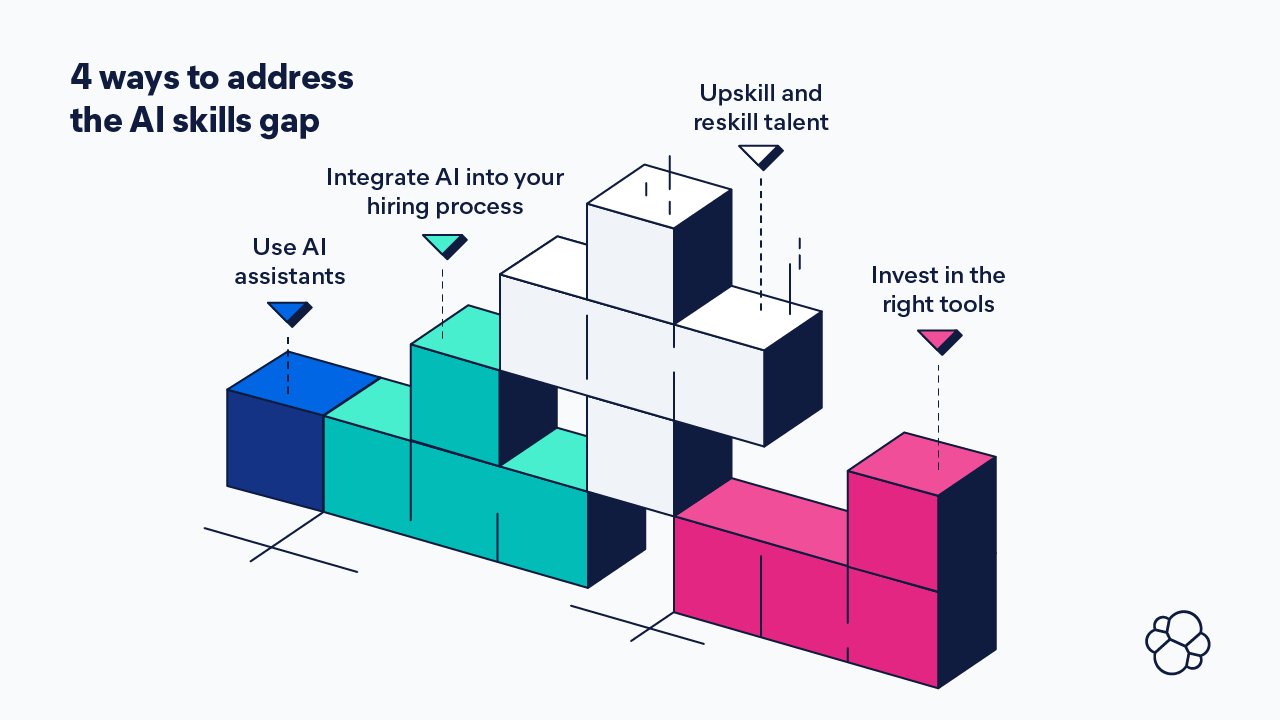
4 ways to address the AI skills gap
- Leverage AI assistants to improve uptime and respond to cybersecurity threats by automating alert investigation and incident response, while empowering your security analysts and SREs of any skill level.
- Use generative AI tools to help during the hiring process and help find the right people for the job, even if their formal education or background doesn’t perfectly match a job description. Get access to a wider variety of talent and look for the potential in all candidates.
- Upskill and reskill existing talent to ease the workload of your senior-level security teammates, freeing them to focus on true threat hunting. Continuous training for employees is a must — the adoption of AI tools will accelerate, as will the evolution of the technology.
- Search for other tools that can support your existing teams. For example, find a data platform that can automate manually intensive tasks, provide your analysts with answers in real time, and explain in natural language how to respond to potential threats.
There's no single approach to solving the AI skills and talent gap. It's a combination of applying the latest innovations to find the right people, expanding training to enable employees without the technical know-how to do the work, and providing people with the right tools for the job.
Soon, GenAI will drive change in your organization and redefine the skill sets within your teams, ensuring you cultivate and uplift a more engaged and future-ready workforce.
Get started with GenAI
Out of all surveyed organizations, 99% reported they believe generative artificial intelligence (GenAI) has the potential to drive change within their organization, be it internal or external. So how can you go from vision to reality when implementing generative AI? It starts with making use of your vast amounts of data with the help of GenAI tools. From there, you can equip your employees and empower your customers with self-service interfaces powered by natural language processing (NLP).
We've laid out the steps and best practices that worked for our organization when we created the Elastic AI Assistant and Elastic Attack Discovery. We wanted to share our process in hopes that it can help you on your generative AI journey.
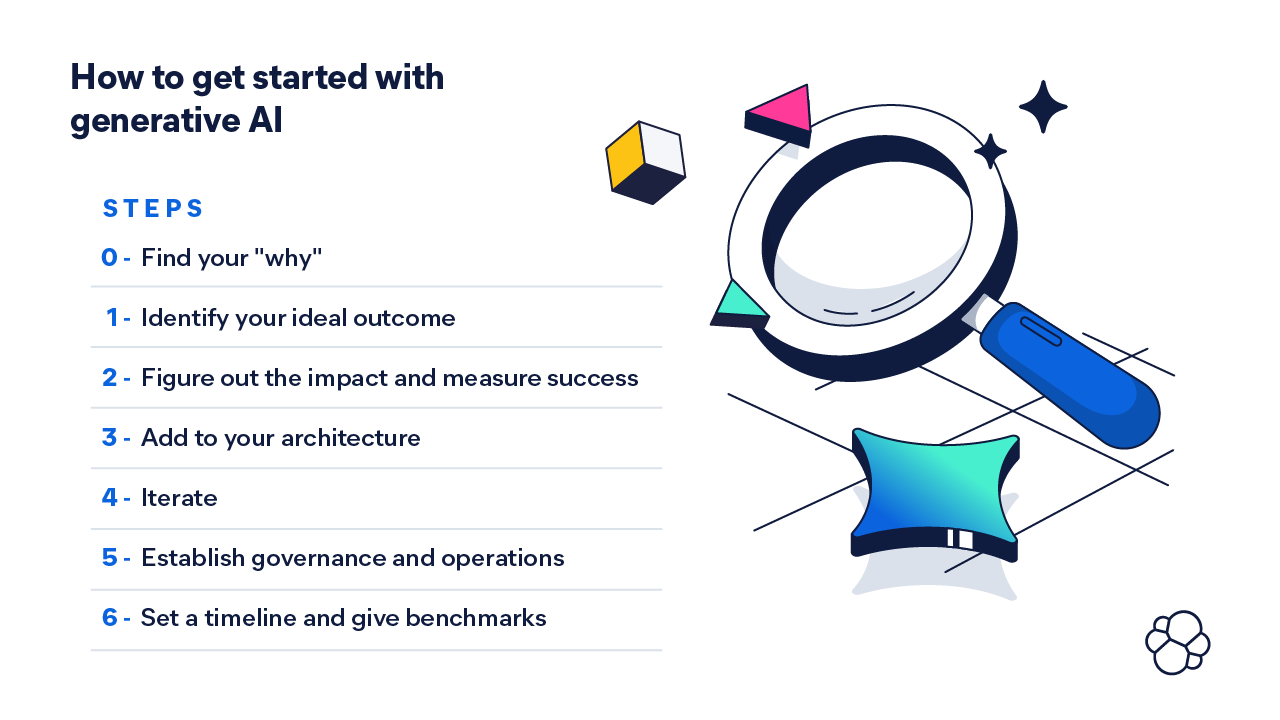
Step 0: Find the why and determine what’s possible
Before you embark on your generative AI journey, you need to figure out what problem you want to solve for and if that problem can be solved with a knowledge base and large language model (LLM). If you aren’t sure where to begin, look internally. When 69% of surveyed organizations say employees struggle to get access to data when they need it, a great start would be to build something that helps employees find what they need. But maybe that isn’t an issue for your organization.
For a deep dive into generative AI use cases, download our ebook.
Step 1: Identify your ideal outcome
Now that you’ve honed in on your single problem and know you’re looking to optimize an inefficient process, you can think about how users will interact with your solution and what the ideal outcome will be. Say you want to increase customer retention. To do that, you want to implement personalized product search.
Then, you’ll craft your metrics for success. Your ideal outcome will sound something like, “by interacting in this new way with our data, customers will effortlessly find the products they need and discover products they might want, based on their search history and location. As a result, customer retention will improve.”
Step 2: Figure out the impact and measure success
Based on your ideal outcome, you’ll want to establish a set of KPIs that can help you measure what success means for your application. You can focus on KPIs like impact on productivity (hours saved), scalability (how well it can handle an increase in usage and demand), the bottom line (costs and impact on revenue), and more. Use your chosen indicators to determine whether your project is feasible, actionable, scalable, and affordable. These indicators will help you determine your ROI and can be broadened in the future as you expand your use cases.
Step 3: Add to your architecture and choose your technique
Determine what you need to add to your organization to use generative AI. You will need multiple components — some you may already have, and some you may need to look into adding to your architecture.
- A fully managed cloud infrastructure will increase agility, improve cost efficiency, and reduce wasted resources. Chips and hardware are evolving at breakneck speeds. If you invest in building out your own AI data center, it might become obsolete in a few months.
- An LLM will be the foundation that enables generative AI to communicate in and understand natural language.
- A data platform that includes vector, hybrid, and traditional keyword search is what you’ll need to enrich the LLM with the right context from your proprietary data.
- Extensive APIs will enable you to enrich and pass your vast amounts of data to the LLM and your search engine.
And you should consider these technique options:
- Retrieval augmented generation (RAG) is a process that uses an existing pre-trained LLM and a set of techniques to tune the model to meet your needs. The benefit of RAG is that it uses your proprietary data to provide the context and relevance users need in responses. Deployment time could be a few days.
- Fine-tuning an LLM uses an existing LLM with your search engine and a vector database to use proprietary data with context. It’s easier to ensure accuracy and relevance for the specific tasks the model has been tuned for. Still, you need to think if you have a large enough data set to provide the LLM with sufficient learning material. Deployment time for this typically takes a few weeks.
- Pre-training an LLM is very resource-intensive and entails starting from scratch by training an LLM on your own large data set. Deployment time for this can take months.
How you combine these components will affect your timeline and the project's complexity.
Step 4: Iterate
A rapidly evolving digital ecosystem means there are a lot of moving parts in a generative AI project. There is only so much control you can have on a pre-trained LLM, as well as a limited amount of flexibility to manipulate your architecture. This is the time to take an iterative approach: you have your use case, you’ve established desired outcomes, you’ve set KPIs, and you’ve considered how to implement your generative AI project. Now you can:
- Build a feedback loop to establish a reporting structure.
- Enrich your LLM to ensure it has access to the right information stored in your vector database.
- Fine-tune the user experience to confirm your app can help and is accessible to your customers and employees.
Establish a reference architecture that can scale to understand what it would look like if you expanded into new use cases.
Step 5: Establish governance and operations
Anticipate potential obstacles and ensure your project remains aligned to your business objectives by establishing governance and operations. Consider:
- Cost management: You’ll be billed per thousand tokens. There’s one cost for prompting and one cost for getting responses.
- Logging and storage: You’ll log every interaction to ensure quality responses.
- Response sentiment: You’ll need to ensure responses are on brand and within your company’s tone and voice.
- Hallucinations: You’ll need to monitor for hallucinations that include incorrect responses, hate speech, and antisocial behavior.
- Inconclusive answers: You’ll also need to monitor the quality and relevance of the responses.
Step 6: Set a timeline and give it benchmarks
Set goalposts at 30- and 90-day marks to prove the value of your generative AI-boosted use case.
By day 30, you might have:
- Chosen your use case
- Assigned a team to the task
- Facilitated training sessions
- Established desired outcomes
- Built a prototype
And by day 90, you have:
- Tested the app with some internal people
- Tested the outputs generated
- Monitored the way users interact with the interface
- Established a set of guidelines for what makes a quality output
- Collected data on key performance metrics
- Measured the value of the initiative
These are just examples of what you can set as your goalposts. Make them work for your project. The important thing is that you set goals that you can say you were able to accomplish or not at the end of the period.
Get started with generative AI now
With 86% of IT leaders believing generative AI will soon have a prominent role in their organizations, it’s time to start implementing it now. Innovation in generative AI is moving fast. But you can’t go anywhere without the basics or without taking this on a step at a time.
Ensuring you have a solid strategy in place to implement generative AI can help you harness the power of your vast amounts of data without getting distracted by exciting but irrelevant innovations. To most effectively operationalize generative AI, dedicate the time and resources to implement it in stages and set attainable goals. Integrating new technology with purpose is the recipe for the highest return on your investment. Customizing and adapting AI tools to meet your operational needs ensures relevance and effectiveness — which is generative AI’s "calling" in the first place.
Footnotes
1 Open AI, Introducing ChatGPT. 2022.
2 The Verge, From Eliza to ChatGPT: why people spent 60 years building chatbots. 2024.
3 Zendesk, Customer experience: A comprehensive guide for 2024. 2024.
4 HubSpot, HubSpot Annual State of Service. 2022.
5 HBR, Harvard Business Review: Kick-Ass Customer Service. 2017.
6 New York Times, Chatbots May ‘Hallucinate’ More Often Than Many Realize. 2023.
7 Forbes, Cybersecurity Stats. 2024.
8 Salesforce, State of IT Report. 2023.
9 World Economic Forum, Strategic Cybersecurity Talent Framework. 2024.
10 Time estimates of tasks leveraging AI are based on Elastic Security's AI-driven security analytics and its built-in features.
11 Investigation and threat hunting tasks are subject to analysts' access to data, speed of SIEM used, threat type at hand, and other factors.
12 GitHub, The developer wishlist. 2024.
13 Forbes, The true cost of downtime (and how to avoid it). 2024.
14 Thomson Reuters, Needed AI skills facing unknown regulations and advancements. 2023.
15 IDC, IT Skills Shortage Expected to Impact Nine out of Ten Organizations by 2026. 2024.
16 Robert Half, Building future-forward tech teams. 2024.
17 Salesforce, AI balancing act. 2024.
18 Business Insider, Personal CEO calls and $1 million pay packages. 2024.
19 US Chamber of Commerce, AI for hiring. 2024.
20 Randstad, Workmonitor Pulse survey. 2023.
21 Skillsoft, IT skills and salary report. 2023.
22 World Economic Forum, The future of jobs report. 2023.
23 Gartner, Nearly half of cybersecurity leaders will change jobs. 2023.
Share
- Share on Twitter
Share on Twitter
- Share on LinkedIn
Share on LinkedIn
- Share on Facebook
Share on Facebook
- Share by Email
Share by Email
- Print this page
Print