Templates
Templates are the mechanism by which Elasticsearch applies settings, mappings, and other configurations when creating indices or data streams.
You configure templates prior to creating indices or data streams. When an index is created, either manually or by indexing a document, the matching template determines the settings, mappings, and other configurations to apply. When used with a data stream, a template also defines how each backing index is configured as it is created.
There are two types of template:
An index template is the main configuration object applied when creating an index or data stream. It matches index names using
index_patternsand resolves conflicts using apriorityvalue. An index template can optionally define settings, mappings, and aliases directly, and refer to a list of component templates that provide reusable configuration blocks. It can also indicate whether it should create a data stream or a regular index.A component template is a reusable building block that defines settings, mappings, and aliases. Component templates are not applied directly; they must be referenced by index templates.
Together, index templates and their referenced component templates form what is known as composable templates.
For a detailed exploration and examples of setting up composable templates, refer to the Elastic blog Index templating in Elasticsearch: How to use composable templates.
The following conditions apply to using templates:
- Composable index templates take precedence over any legacy templates, which were deprecated in Elasticsearch 7.8. If no composable template matches a given index, a legacy template might still match and be applied.
- If an index is created with explicit settings and also matches an index template, the settings from the create index request take precedence over settings specified in the index template and its component templates.
- Settings specified in the index template itself take precedence over the settings in its component templates.
- When you specify multiple component templates in the
composed_offield of an index template, the component templates are merged in the order specified, which means that later component templates override earlier component templates. - If a new data stream or index matches more than one index template, the index template with the highest priority is used.
- When you create an index template, be careful to avoid naming pattern collisions with built-in Elasticsearch index templates.
An index template is used to configure an index when it is created. Mappings, settings, and aliases specified in the index template are inherited by each created index. These can also be specified in the component templates that the index template is composed of.
You can create and manage index templates in Kibana or using the Elasticsearch API.
If you use Elasticsearch security features, the following security privileges are required:
- The
manage_index_templatescluster privilege to manage index templates.
To add these privileges, go to Stack Management > Security > Roles or use the Create or update roles API.
To create an index template, complete the following steps:
Go to the Index Management page using the navigation menu or the global search field.
In the Index Templates tab, select Create template.
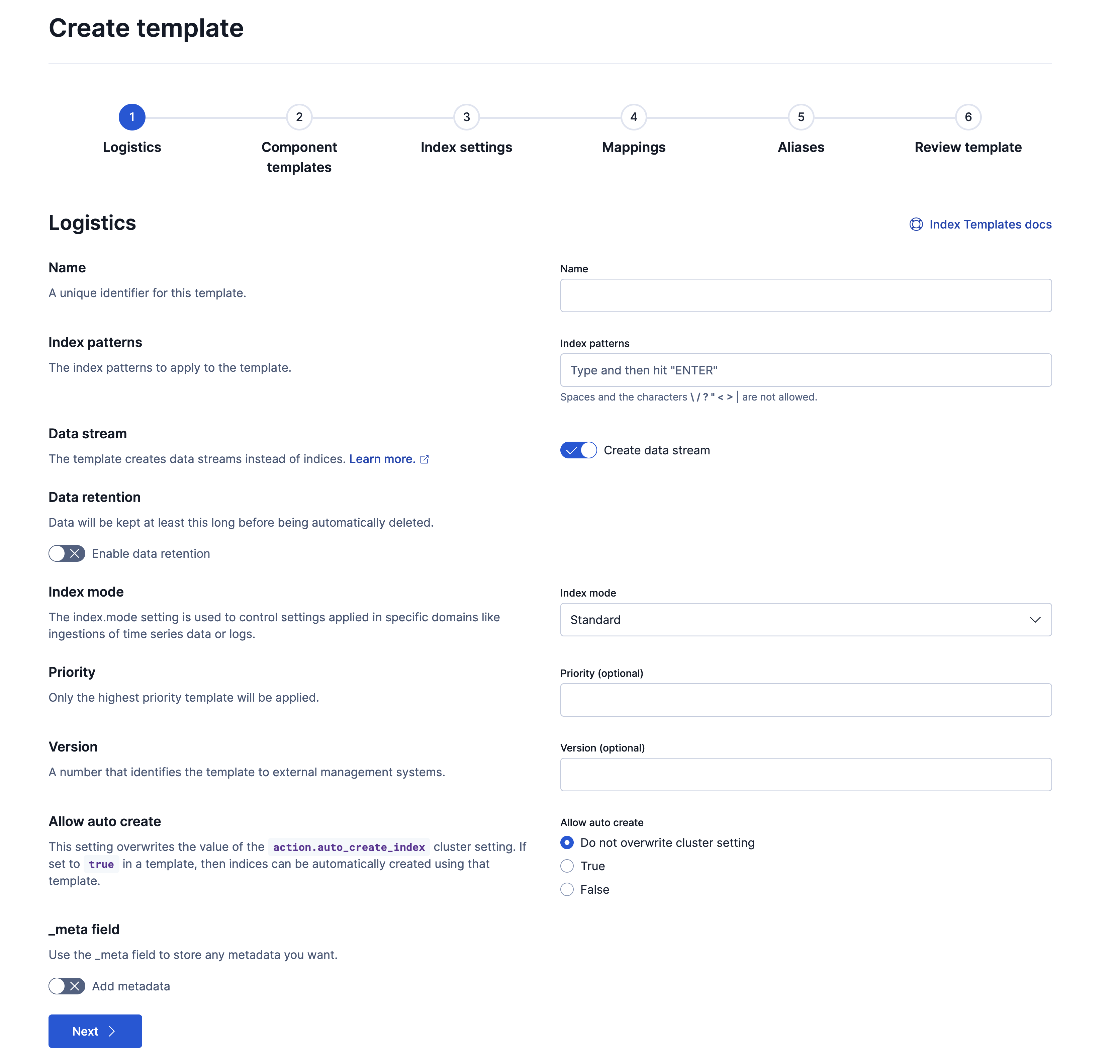
On the Logistics page:
Specify a name for the template.
Specify a pattern to match the indices you want to manage with the lifecycle policy. For example,
my-index-*. Be careful to avoid naming pattern collisions with built-in Elasticsearch index templates.If you're storing continuously generated, append-only data, you can opt to create data streams instead of indices for more efficient storage.
NoteWhen you enable the data stream option, an option to set Data retention also becomes available. Data retention is applicable only if you're using a data stream lifecycle, which is an alternative to index lifecycle management. Refer to the Data stream lifecycle to learn more.
Configure any other options you'd like, including:
- The index mode to use for the created indices.
- The template priority, version, and any metadata.
- Whether or not to overwrite the
action.auto_create_indexcluster setting.
Refer to the create or update index template API documentation for details about these options.
On the Component templates page, you can use the search and filter tools to select any component templates to include in the index template. The index template will inherit the settings (S), mappings (M), and aliases (A) defined in the component templates and apply them to indices when they're created.
On the Index settings page, you can define your index settings directly in the index template. When used together with component templates, the mappings defined on this page will override any conflicting definitions from the associated component templates.
Optional: Add any additional index settings that should be applied to the indices as they're created. For example, you can set the number of shards and replicas for each index, as well as configure ILM by specifying ILM settings to apply to the indices:
{
  "index.lifecycle.name": "my_policy",
  "index.lifecycle.rollover_alias": "test-alias",
  "number_of_shards": 1,
  "number_of_replicas": 1
}
Optional: On the Mappings page, customize the fields and data types used when documents are indexed into Elasticsearch. When used together with component templates, these mappings override any conflicting definitions from the associated component templates. Refer to Mapping for details.
Optional: On the Aliases page, specify an alias for each created index. For example, you can define an alias named
my-index:{ "my-index": {} }Note that this isn't required when configuring ILM, which instead uses the
index.lifecycle.rollover_aliassetting to access rolling indices.On the Review page, confirm your selections and select Create template. You can check your selected options, as well as both the format of the index template that will be created and the associated API request.
The newly created index template will be used for all new indices with names that match the specified pattern, and for each of these, the specified ILM policy will be applied.
Optional: Create new indices to test your template
To test your newly created template, you can create two new indices, for example my-index-000001 and my-index-000002.
Index the following documents, to create new indices:
POST /my-index-000001/_doc{ "@timestamp": "2019-05-18T15:57:27.541Z", "ip": "225.44.217.191", "extension": "jpg", "response": "200", "geo": { "coordinates": { "lat": 38.53146222, "lon": -121.7864906 } }, "url": "https://media-for-the-masses.theacademyofperformingartsandscience.org/uploads/charles-fullerton.jpg" }POST /my-index-000002/_doc{ "@timestamp": "2019-05-20T03:44:20.844Z", "ip": "198.247.165.49", "extension": "php", "response": "200", "geo": { "coordinates": { "lat": 37.13189556, "lon": -76.4929875 } }, "memory": 241720, "url": "https://theacademyofperformingartsandscience.org/people/type:astronauts/name:laurel-b-clark/profile" }Use the get index API to view the configurations for the new indices. The indices were configured using the index template you created earlier.
GET /my-index-000001,my-index-000002
Use the create or update index template API to add an index template to a cluster.
The following request creates an index template that is composed of the two component templates shown in the component templates example.
				PUT _index_template/template_1
					{
  "index_patterns": ["te*", "bar*"],
  "template": {
    "settings": {
      "number_of_shards": 1
    },
    "mappings": {
      "_source": {
        "enabled": true
      },
      "properties": {
        "host_name": {
          "type": "keyword"
        },
        "created_at": {
          "type": "date",
          "format": "EEE MMM dd HH:mm:ss Z yyyy"
        }
      }
    },
    "aliases": {
      "mydata": { }
    }
  },
  "priority": 501,
  "composed_of": ["component_template1", "runtime_component_template"],
  "version": 3,
  "_meta": {
    "description": "my custom"
  }
}
- Choose patterns that avoid collisions with built-in Elasticsearch index templates.
The following features can be useful when you're setting up index templates:
- You can test the effect of an index template before putting it into use. Refer to Simulate multi-component templates to learn more.
- You can create an index template for a component template that does not yet exist. When doing so, you can use the
ignore_missing_component_templatesconfiguration option in an index template so that the missing component template is ignored. Refer to Ignore missing component templates to learn more.
Elasticsearch has built-in index templates, each with a priority of 100, for the following index patterns:
.kibana-reporting*logs-*-*metrics-*-*synthetics-*-*profiling-*security_solution-*-*$.logs$.logs.*logs.otellogs.otel.*logs.ecslogs.ecs.*
Elastic Agent uses these templates to create data streams. Index templates created by Fleet integrations use similar overlapping index patterns and have a priority up to 200.
If you use Fleet or Elastic Agent, assign your index templates a priority lower than 100 to avoid overriding these templates. Otherwise, to avoid accidentally applying the templates, do one or more of the following:
- To disable all built-in index and component templates, set
stack.templates.enabledtofalseusing the cluster update settings API. Note, however, that this is not recommended, see the setting documentation for more information. - Use a non-overlapping index pattern.
- Assign templates with an overlapping pattern a
priorityhigher than500. For example, if you don’t use Fleet or Elastic Agent and want to create a template for thelogs-*index pattern, assign your template a priority of501. This ensures your template is applied instead of the built-in template forlogs-*-*. - To avoid naming collisions with built-in and Fleet-managed index templates, avoid using
@as part of the name of your own index templates. - Beginning in Elastic Stack version 9.1, Fleet uses indices named
fleet-synced-integrations*for a feature. Avoid using this name to avoid collisions with built-in indices.
A component template is a reusable building block that defines mappings, settings, and aliases. Component templates are not applied directly to indices, but referenced by index templates and used when determining the final configuration of an index.
You can create and manage component templates in Kibana or using the Elasticsearch API.
You can create, edit, clone, and delete your component templates on the Index management page in Kibana. Go to the Component Templates tab.
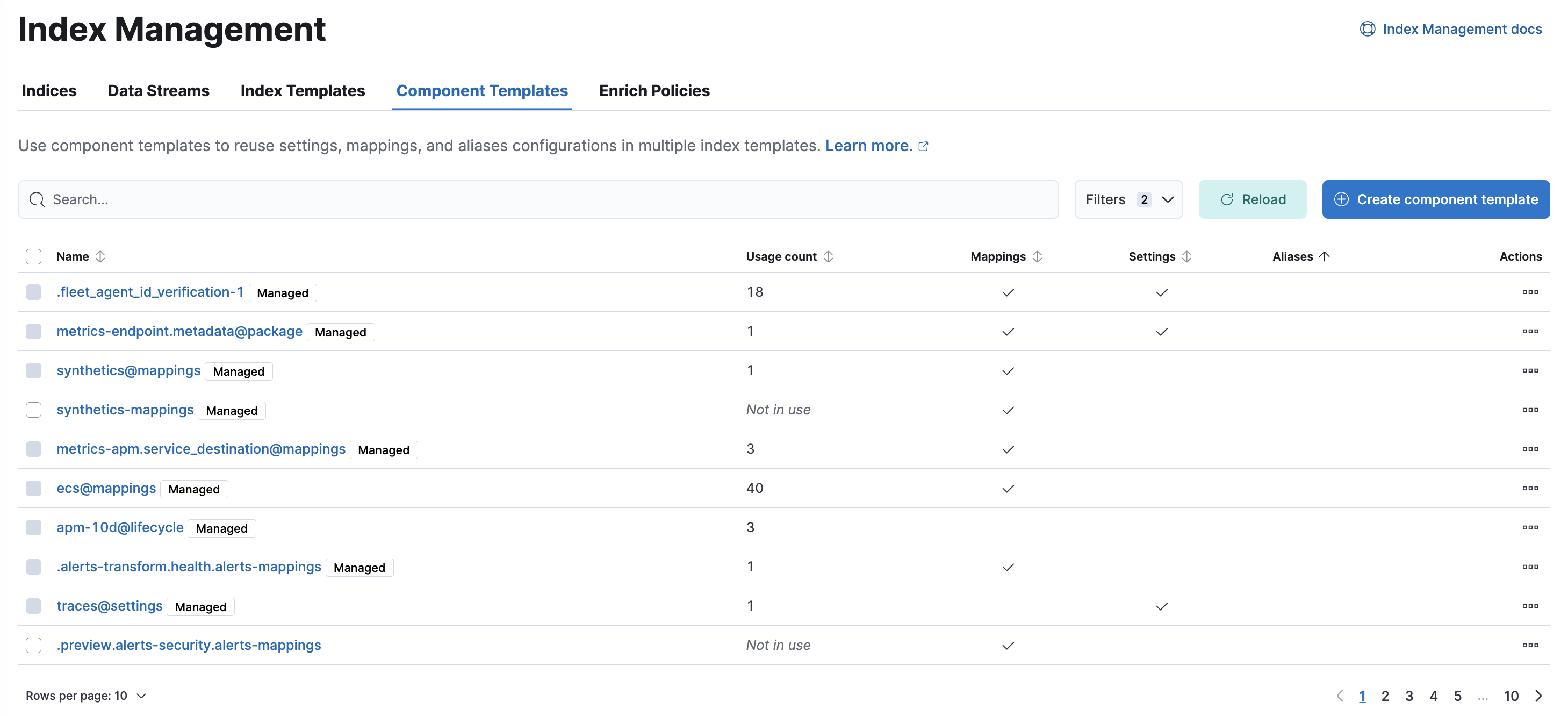
- To show details and perform operations, click the template name.
- To create new component templates, use the Create component template wizard.
You can create and manage component templates using the component template API. The following request creates the two component templates used in the previous index template example:
				PUT _component_template/component_template1
					{
  "template": {
    "mappings": {
      "properties": {
        "@timestamp": {
          "type": "date"
        }
      }
    }
  }
}
				PUT _component_template/runtime_component_template
					{
  "template": {
    "mappings": {
      "runtime": {
        "day_of_week": {
          "type": "keyword",
          "script": {
            "source": "emit(doc['@timestamp'].value.dayOfWeekEnum.getDisplayName(TextStyle.FULL, Locale.ENGLISH))"
          }
        }
      }
    }
  }
}
- This component template adds a runtime field named
day_of_weekto the mappings when a new index matches the template.