NGINX metrics and logs from OpenTelemetry Collector
| Version | 0.3.0
|
| Subscription level What's this? |
Basic |
| Developed by What's this? |
Elastic |
| Minimum Kibana version(s) | 9.3.0 |
To use beta integrations, go to the Integrations page in Kibana, scroll down, and toggle on the Display beta integrations option.
The NGINX OpenTelemetry Assets package allows you to monitor Nginx, a high-performance web server, reverse proxy, and load balancer. NGINX is widely used for serving web content, proxying traffic, and load balancing across multiple servers.
Use the NGINX OpenTelemetry Assets package to collect and analyze performance metrics and logs from your NGINX instances. Then visualize that data in Kibana, create alerts to notify you if something goes wrong, and reference metrics and logs when troubleshooting performance issues.
For example, if you want to monitor the request rate or connection status of your NGINX server, you can use the NGINX Receiver to collect metrics such as nginx.requests or nginx.connections_current, and the Filelog Receiver to collect access and error logs. The NGINX OpenTelemetry Assets package lets you visualize these in Kibana dashboards, set up alerts for high error rates, or troubleshoot by analyzing metric and log trends.
You need Elasticsearch for storing and searching your data and Kibana for visualizing and managing it. You can use our hosted Elasticsearch Service on Elastic Cloud, which is recommended, or self-manage the Elastic Stack on your own hardware.
Compatibility and supported versions: This package is compatible with systems running either EDOT Collector or vanilla upstream Collector and NGINX with the
stub_statusmodule enabled. This package has been tested with OTEL collector version v0.146.1, EDOT collector version 9.0, and NGINX version 1.27.5.Permissions required: The collector requires access to the NGINX
stub_statusendpoint (for example, http://localhost:80/nginx_status) and read access to the NGINX log files (typically/var/log/nginx/access.logand/var/log/nginx/error.log). When running the collector, make sure you have the appropriate permissions.NGINX configuration: The NGINX
stub_statusmodule must be enabled, and the status endpoint must be accessible. For example:
server {
    listen 80;
    server_name localhost;
    location /nginx_status {
        stub_status on;
        allow 127.0.0.1;
        deny all;
    }
}
Make sure the NGINX
stub_statusmodule is enabled and the status endpoint is accessible.Make sure the NGINX access and error log files are readable by the collector.
Install and configure the EDOT Collector or upstream Collector to export metrics and logs to Elasticsearch.
The collector configuration uses nginx and filelog receivers:
nginx— Scrapes performance metrics from the NGINXstub_statusendpoint.filelog/nginx_access— Tails the NGINX access log file.filelog/nginx_error— Tails the NGINX error log file, with multiline support for entries that span multiple lines.
extensions:
  file_storage:
    directory: /var/otelcol/storage

receivers:
  nginx:
    endpoint: "http://localhost:80/nginx_status"
    collection_interval: 10s

  filelog/nginx_access:
    include: [/var/log/nginx/access.log]
    include_file_path: true
    start_at: beginning
    storage: file_storage

  filelog/nginx_error:
    include: [/var/log/nginx/error.log]
    include_file_path: true
    start_at: beginning
    multiline:
      line_start_pattern: '^\d{4}/\d{2}/\d{2} \d{2}:\d{2}:\d{2}'
    storage: file_storage
The file_storage extension persists the filelog receiver checkpoints so log collection resumes from the correct position after a restart.
The transform processors parse raw log lines into structured fields using grok patterns:
transform/parse_nginx_access/log— Parses the NGINX combined access log format and extracts fields such ashttp.request.method,http.response.status_code,url.original,source.address,http.response.body.size,http.version, anduser_agent.original. It also runs user-agent parsing to populateuser_agent.name.transform/parse_nginx_error/log— Parses NGINX error log entries and extractslog.level,process.pid,process.thread.id,nginx.error.connection_id, andmessage.resourcedetection/system— Detects and attaches host-level resource attributes such ashost.nameandhost.arch.
processors:
  transform/parse_nginx_access/log:
    error_mode: ignore
    log_statements:
      - context: log
        conditions:
          - IsMatch(body, "^[\\d.]+ - .+ \\[.+\\] \".+\" \\d+ \\d+ \".+\" \".+\"")
        statements:
          - set(body, ExtractGrokPatterns(body, "%{IPORHOST:source.address} - (-|%{DATA:user.name}) \\[%{HTTPDATE:nginx.access.time}\\] \"%{WORD:http.request.method} %{DATA:url.original} HTTP/%{NUMBER:http.version}\" %{NUMBER:http.response.status_code:long} %{NUMBER:http.response.body.size:long} \"(-|%{DATA:http.request.referrer})\" \"(-|%{DATA:user_agent.original})\"", true))
          - set(attributes["data_stream.dataset"], "nginx.access")
          - set(attributes["event.name"], "nginx.access")
          - set(time, Time(body["nginx.access.time"], "%d/%b/%Y:%H:%M:%S %z"))
          - delete_key(body, "nginx.access.time")
          - set(attributes["http.response.status_code"], body["http.response.status_code"])
          - set(attributes["http.request.method"], body["http.request.method"])
          - set(attributes["url.original"], body["url.original"])
          - set(attributes["source.address"], body["source.address"])
          - set(attributes["http.response.body.size"], body["http.response.body.size"])
          - set(attributes["http.version"], body["http.version"])
          - set(attributes["user_agent.original"], body["user_agent.original"])
      - context: log
        conditions:
          - body["user_agent.original"] != nil
        statements:
          - merge_maps(body, UserAgent(body["user_agent.original"]), "upsert")
          - set(attributes["user_agent.name"], body["user_agent.name"])

  transform/parse_nginx_error/log:
    error_mode: ignore
    log_statements:
      - context: log
        conditions:
          - IsMatch(body, "^\\d{4}/\\d{2}/\\d{2} \\d{2}:\\d{2}:\\d{2} \\[.+\\]")
        statements:
          - 'set(body, ExtractGrokPatterns(body, "%{DATA:nginx.error.time} \\[%{LOGLEVEL:log.level}\\] %{NUMBER:process.pid:long}#%{NUMBER:process.thread.id:long}: (\\*%{NUMBER:nginx.error.connection_id:long} )?%{GREEDYMULTILINE:message}", true, ["GREEDYMULTILINE=(.|\\n)*", "LOGLEVEL=[a-zA-Z]+"]))'
          - set(attributes["data_stream.dataset"], "nginx.error")
          - set(attributes["event.name"], "nginx.error")
          - set(severity_text, body["log.level"])
          - set(attributes["log.level"], body["log.level"])
          - set(attributes["message"], body["message"])
          - set(attributes["process.pid"], body["process.pid"])

  resourcedetection/system:
    detectors: ["system"]
    system:
      hostname_sources: ["os"]
Configure the exporter and wire the pipelines together:
exporters:
  elasticsearch:
    endpoint: https://localhost:9200
    user: <userid>
    password: <password>
    # tls:
    #  insecure_skip_verify: true
    mapping:
      mode: otel

service:
  extensions: [file_storage]
  pipelines:
    logs/nginx_access:
      receivers: [filelog/nginx_access]
      processors: [transform/parse_nginx_access/log, resourcedetection/system]
      exporters: [elasticsearch]
    logs/nginx_error:
      receivers: [filelog/nginx_error]
      processors: [transform/parse_nginx_error/log, resourcedetection/system]
      exporters: [elasticsearch]
    metrics:
      receivers: [nginx]
      processors: [resourcedetection/system]
      exporters: [elasticsearch]
The resourcedetection/system processor is required across all pipelines to populate host information used by the dashboard.
This package includes three pre-built Kibana dashboards:
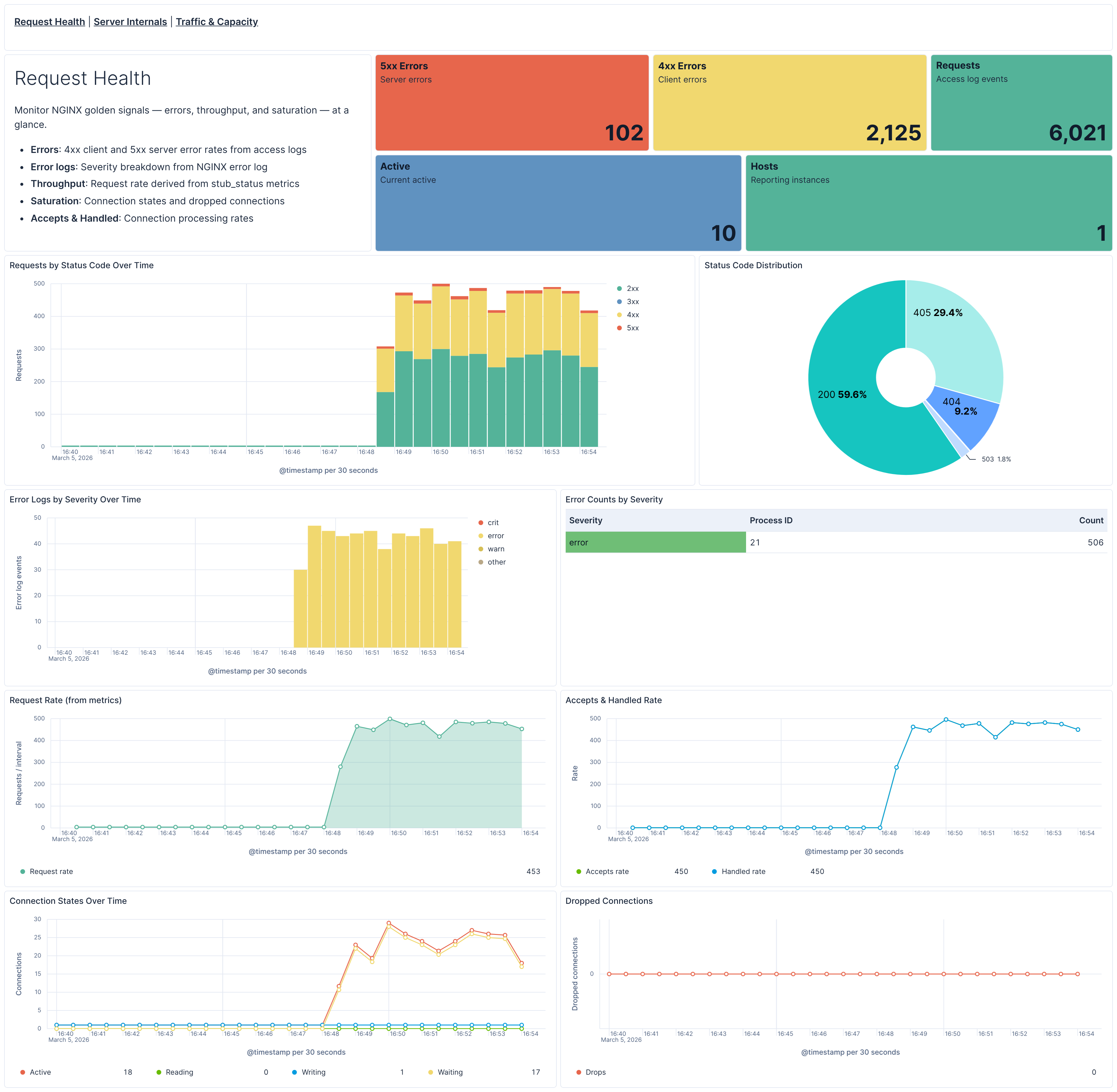
- [Nginx OTel] Request Health — Golden signals overview: errors (4xx/5xx), throughput, and saturation. Monitors request rates from access logs, error log severity, and connection states from stub_status metrics.
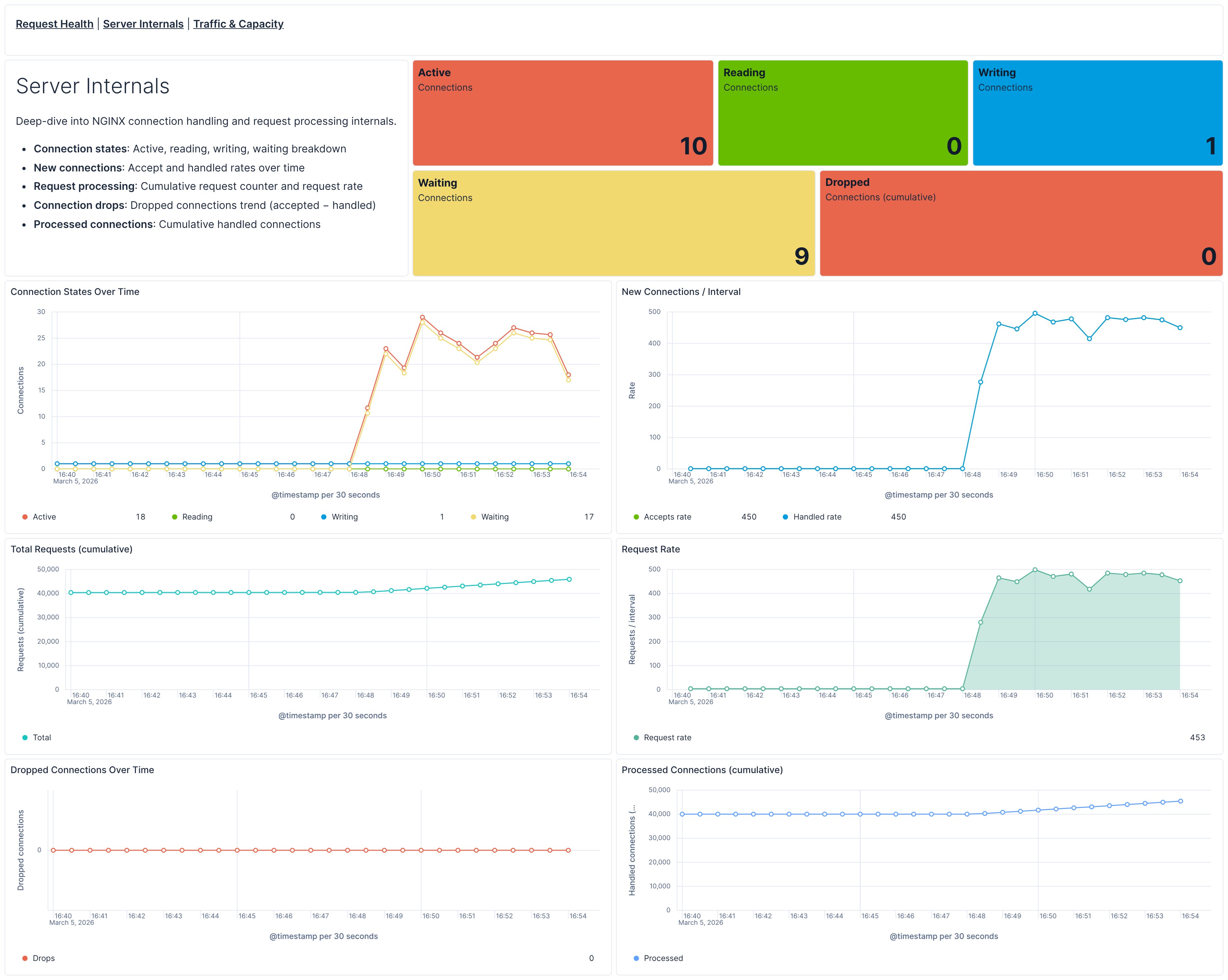
- [Nginx OTel] Server Internals — Deep-dive into connection handling: active/reading/writing/waiting states, accept and handled rates, request processing, and dropped connections.
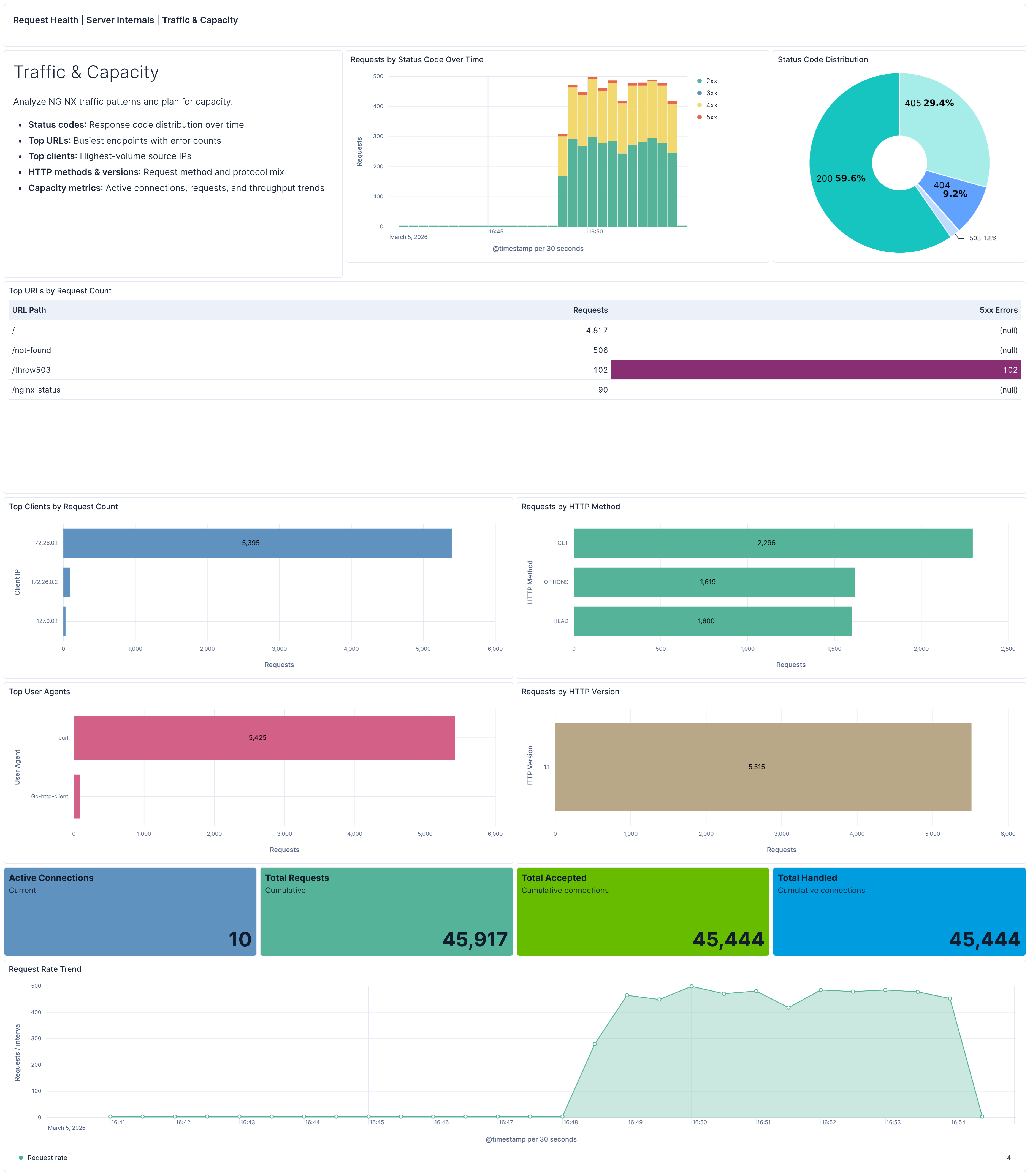
- [Nginx OTel] Traffic & Capacity — Traffic analysis with status code distribution, top URLs, top clients, HTTP methods and versions, plus capacity planning metrics and request rate trends.
Each dashboard includes a host filter control and cross-links to navigate between views.
This package ships five alerting rule templates that you can enable and customize:
| Rule | Default threshold | Window | Description |
|---|---|---|---|
| [Nginx OTel] High 4xx error rate | > 15% | 15 min | Fires when the share of HTTP 4xx client errors exceeds the threshold per host (minimum 50 requests). |
| [Nginx OTel] High 5xx error rate | > 5% | 15 min | Fires when the share of HTTP 5xx server errors exceeds the threshold per host (minimum 50 requests). |
| [Nginx OTel] High active connections | > 256 avg | 5 min | Fires when average active connections exceed the threshold. Adjust to match your NGINX worker_connections setting. |
| [Nginx OTel] Error log spike | > 50 entries | 15 min | Fires when severe error log entries (error, crit, alert, emerg) exceed the threshold per host. |
| [Nginx OTel] Dropped connections | Any drop detected | 5 min | Fires when NGINX accepted more connections than it handled, indicating resource exhaustion. |
All rules use ES|QL queries, run every 1 minute, and group by host.name. Thresholds can be adjusted to match your environment's baseline.
SLO templates require Elastic Stack version 9.4.0 or later.
This package includes two SLO templates:
| SLO | Target | Window | Description |
|---|---|---|---|
| [Nginx OTel] Request availability | 99% | Rolling 30 days | Percentage of requests that return a non-server-error response (status code < 500). Uses occurrence-based budgeting over access logs. |
| [Nginx OTel] Connection handling rate | 99.5% | Rolling 30 days | Percentage of 1-minute time slices where all accepted connections are handled (no drops). Uses timeslice budgeting over stub_status metrics. |
Both SLOs are grouped by host.name, allowing per-instance tracking.
The NGINX receiver collects performance metrics from the NGINX stub_status module. Key metrics include:
| Metric Name | Description | Type | Attributes |
|---|---|---|---|
nginx.requests |
Total number of client requests | Counter | - |
nginx.connections_accepted |
Total number of accepted client connections | Counter | - |
nginx.connections_handled |
Total number of handled connections | Counter | - |
nginx.connections_current |
Current number of client connections by state | Gauge | state: active, reading, writing, waiting |
active: Currently active client connectionsreading: Connections currently reading request headerswriting: Connections currently writing response to clientwaiting: Idle client connections waiting for a request
These metrics provide insights into:
- Request volume and patterns through request counts
- Connection health via accepted, and handled connection statistics
- Server performance using active, reading, writing, and waiting connection states
For a complete list of all available metrics and their detailed descriptions, refer to the NGINX Receiver documentation in the upstream OpenTelemetry Collector repository.
This integration includes one or more Kibana dashboards that visualizes the data collected by the integration. The screenshots below illustrate how the ingested data is displayed.
Changelog
| Version | Details | Minimum Kibana version |
|---|---|---|
| 0.3.0 | Enhancement (View pull request) Add SRE-aligned dashboard hierarchy with Request Health, Server Internals, and Traffic & Capacity dashboards covering access logs, error logs, and metrics. SLO and alerting rule templates |
9.3.0 |
| 0.2.1 | Bug fix (View pull request) Use OTEL host.name instead of host.hostname in dashboard control |
9.2.0 |
| 0.2.0 | Enhancement (View pull request) Add discovery field to support auto-install |
9.2.0 |
| 0.1.1 | Enhancement (View pull request) Add opentelemetry category |
9.0.0 |
| 0.1.0 | Enhancement (View pull request) Dashboard image and logo update |
9.0.0 |
| 0.0.1 | Enhancement (View pull request) Initial draft of the NGINX OTEL content package |
9.0.0 |