Apache HTTP Server OpenTelemetry Assets
| Version | 0.3.0
|
| Subscription level What's this? |
Basic |
| Developed by What's this? |
Elastic |
| Minimum Kibana version(s) | 9.2.1 |
To use pre-release integrations, go to the Integrations page in Kibana, scroll down, and toggle on the Display beta integrations option.
Apache HTTP Server is a widely used open-source web server that delivers web content over HTTP. It supports modular functionality through dynamically loadable modules, including mod_status for runtime server performance monitoring.
This package provides dashboards, alert rules, and SLO templates for monitoring Apache HTTP Server using data collected by the OpenTelemetry Collector's Apache receiver, covering request traffic, worker pool utilization, connection management, and system resource consumption.
The Apache HTTP Server OpenTelemetry assets have been tested with OpenTelemetry Apache receiver v0.146.1.
Apache versions tested against:
- Apache 2.4
You need Elasticsearch for storing and searching your data and Kibana for visualizing and managing it. You can use our hosted Elasticsearch Service on Elastic Cloud, which is recommended, or self-manage the Elastic Stack on your own hardware.
The Apache receiver collects metrics from Apache's mod_status module. You must enable mod_status and make the server-status endpoint accessible.
- Ensure
mod_statusis loaded in your Apache configuration:
LoadModule status_module modules/mod_status.so
- Enable
ExtendedStatusand configure access to the status endpoint:
ExtendedStatus On

<Location /server-status>
    SetHandler server-status
    Require local
    Require ip <COLLECTOR_IP>
</Location>
- Verify the endpoint is accessible:
curl http://localhost/server-status?auto
Configure the OpenTelemetry Collector (EDOT Collector or upstream Collector) to scrape Apache metrics and export them to Elasticsearch.
<APACHE_STATUS_ENDPOINT>: Full URL to the Apache server-status endpoint (for example,http://localhost:80/server-status?auto)<ES_ENDPOINT>: Elasticsearch endpoint (for example,https://localhost:9200)${env:ES_USER}: Elasticsearch username (set using an environment variable)${env:ES_PASSWORD}: Elasticsearch password (set using an environment variable)
receivers:
  apache:
    endpoint: <APACHE_STATUS_ENDPOINT>
    collection_interval: 10s

processors:
  resourcedetection/system:
    detectors: ["system"]
    system:
      hostname_sources: ["os"]
      resource_attributes:
        host.name:
          enabled: true
        host.id:
          enabled: false

exporters:
  elasticsearch/otel:
    endpoint: <ES_ENDPOINT>
    user: ${env:ES_USER}
    password: ${env:ES_PASSWORD}
    mapping:
      mode: otel

service:
  pipelines:
    metrics:
      receivers: [apache]
      processors: [resourcedetection/system]
      exporters: [elasticsearch/otel]
Refer to the metadata.yaml of the OpenTelemetry Apache receiver for details on available metrics.
| Dashboard | Description |
|---|---|
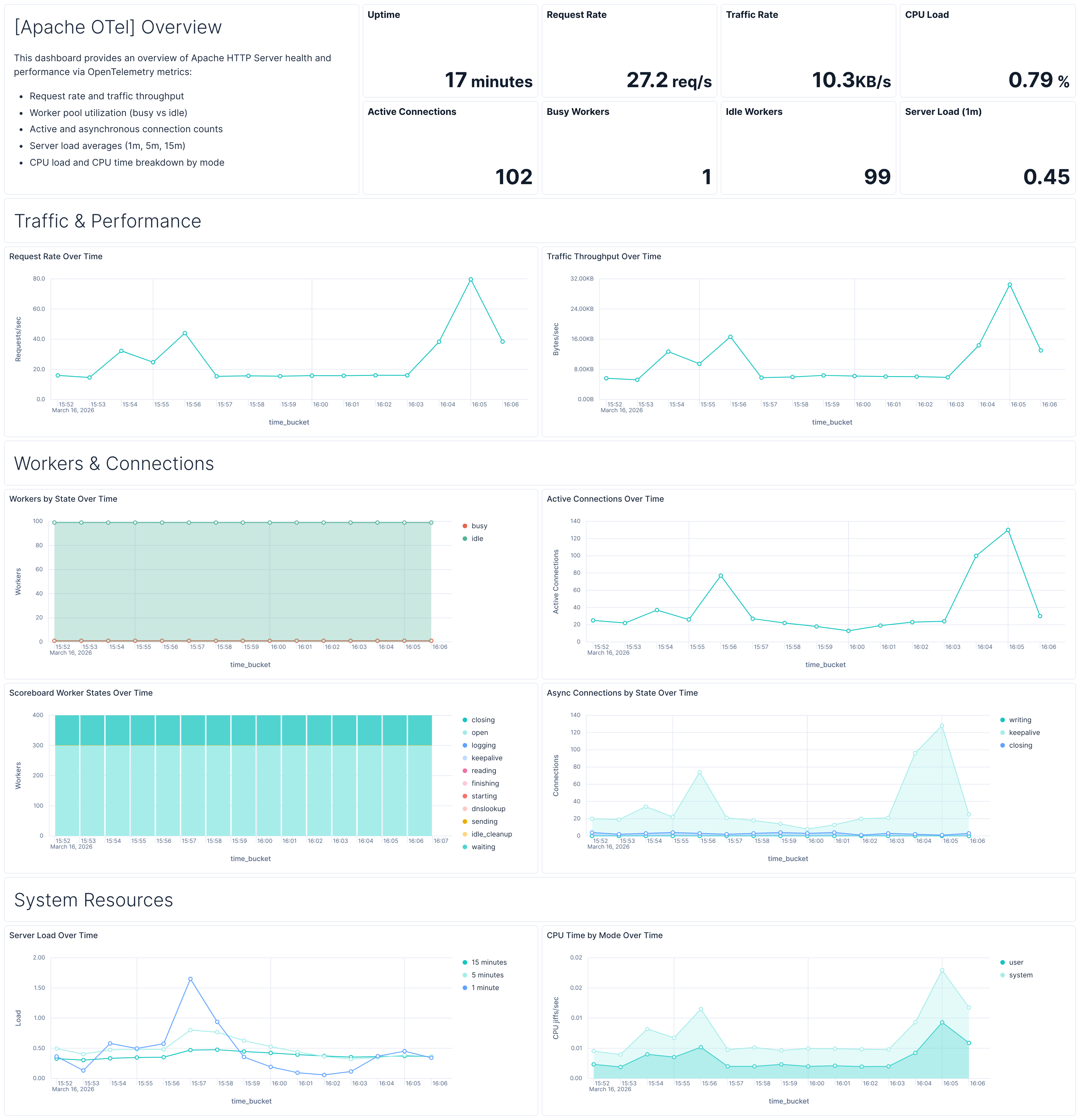
| [Apache OTel] Overview | Overview of Apache HTTP Server health and performance including request rate, traffic throughput, worker pool utilization, connection counts, server load, and CPU usage. |
| Alert | Trigger | Severity |
|---|---|---|
| [Apache OTel] Worker pool exhaustion | Busy workers exceed 80% of total workers for a server over a 5-minute window | High |
| [Apache OTel] High server load | 1-minute server load average exceeds 5.0 over a 5-minute window | High |
| [Apache OTel] No requests received | Zero new requests received by a server over a 5-minute window | Critical |
SLO templates require Elastic Stack version 9.4.0 or later.
| SLO | Target | Window | Description |
|---|---|---|---|
| [Apache OTel] Average request latency | 99% | 30-day rolling | Ensures 99% of 1-minute timeslices show average per-request latency below 200 ms. |
This integration includes one or more Kibana dashboards that visualizes the data collected by the integration. The screenshots below illustrate how the ingested data is displayed.
Changelog
| Version | Details | Minimum Kibana version |
|---|---|---|
| 0.3.0 | Enhancement (View pull request) Replace dashboard with ES|QL-based overview dashboard, add alert rule templates, SLO template, and updated documentation |
9.2.1 |
| 0.2.0 | Enhancement (View pull request) Add discovery field to support auto-install |
9.2.0 |
| 0.1.1 | Enhancement (View pull request) Add opentelemetry category |
9.1.0 |
| 0.1.0 | Enhancement (View pull request) Initial draft of the Apache OTel content package |
9.1.0 |